employment_calPrivate
Project Description & Details
Task
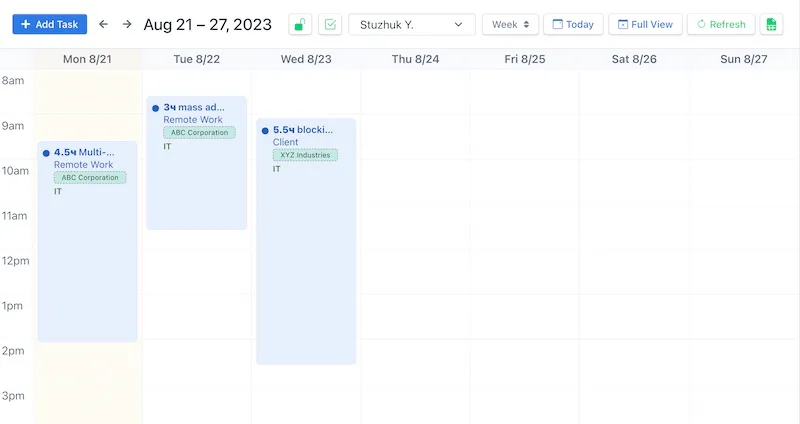
The client needed a unified availability calendar instead of scattered tables and messaging app correspondence. Managers and employees should be able to see shifts, availability, and events in one place, quickly switch between daily, list, and hourly views, and not lose context when planning a week ahead.
The project is commercial, closed (without a public repository), but typical for the line of full-stack web applications and dashboards: rich UI, forms, filters, notifications.
Solution
A SPA calendar was built using FullCalendar with multiple display modes (day grid, time grid, list). Navigation and filters were implemented using Bootstrap and bootstrap-select, and choices.js was used for dropdown lists with search functionality.
Users work in a familiar calendar grid: drag-and-drop and clicks on slots, quick toast notifications via toastify-js, without page reloads. Data is prepared on the client side using lodash (grouping, sorting, date normalization).
Architecture and stack
UI: FullCalendar (core, daygrid, timegrid, list, interaction), Bootstrap 5, custom styles (CSS ~47% of the codebase).
Client-side logic: TypeScript and JavaScript (~50% together) — typing of event models, calendar handlers, UTF-8 localization (text-encoding-utf-8 for proper handling of Cyrillic in export/import).
Build: Vite with vite-plugin-remove-console for production builds without unnecessary console noise.
The interactivity of the calendar is separated into distinct modules: view configuration, a unified event store, and an adapter layer for the client's API (contract not published).
Key features
- Three calendar views — day, list, hourly grid; switching without losing filters.
- Filters and selects — bootstrap-select and choices.js for long directories (departments, roles, shift types).
- Feedback — toastify-js for successful saves and validation errors.
- Data preparation — lodash for aggregating availability over periods and normalizing time zones on the client.
- Production-ready build — removal of console.log, bundle optimization for corporate hosting.
Result
The team transitioned from manual planning in tables to a unified calendar interface. The time for shift approvals was reduced: the manager can see overlaps and "gaps" in the schedule immediately in day/time view. The project is completed (updates until December 2024) and is used as an internal tool.
What I would improve
I would add offline caching for critical date ranges and e2e tests for drag-and-drop scenarios in the time grid. For enterprise — an audit log of slot changes and SSO through corporate IdP.
FAQ
What is «employment_cal» for?
Employment_cal is a dynamic calendar application designed to streamline scheduling and employment management, featuring interactive day, list, and time views. Utilizing robust libraries like FullCalendar and Bootstrap, it offers a seamless user experience for efficiently organizing tasks and events.
Which stack powers «employment_cal»?
Technologies: fullcalendar/core, fullcalendar/daygrid, fullcalendar/interaction, fullcalendar/list, fullcalendar/timegrid, bootstrap, bootstrap-select, choices.js, lodash, text-encoding-utf-8, toastify-js, vite-plugin-remove-console.
Project information
CommercialCompleted
- Created: 04 Sep 2023
- Last Updated: 16 Dec 2024