
Contents
Images are the heaviest part of a typical web page: HTTP Archive data shows media often accounts for more than half of transferred bytes. Over forty years, dozens of formats appeared — not because standards bodies failed, but because each generation fixed a specific flaw in the last: files too large, no transparency, poor photo compression, slow server-side encoding. In 2026, developers do not pick “the best format ever”; they pick a stack for the job: AVIF for photos, SVG for icons, JPEG as a fallback for older clients.
Key takeaways
Formats are trade-offs, not a leaderboard. Each codec optimizes a different angle: file size, decode speed on a weak phone, transparency, archive compatibility, camera pipelines. “Move everything to AVIF” without fallbacks breaks Safari 15 and parts of the enterprise browser long tail.
JPEG survives because it is universal, not because it wins on bytes. It loses to AVIF and WebP at the same visual quality, but decodes instantly on virtually every device from the last thirty years. In production, JPEG remains the safety net inside <picture> and CDN transforms.
The modern web is a format stack, not a single winner. Hero photos: AVIF + WebP + JPEG; UI icons: SVG or PNG; animation: short video (MP4/WebM) instead of GIF. Format choice directly affects Core Web Vitals and LCP.
Encoding costs more than decoding. AVIF and JPEG XL shrink files but compression on the server or in CI can take seconds per frame. For CMS pipelines with thousands of uploads, workflow (cache, background workers) matters more than squeezing the last percent of quality.
Why there are so many image formats
If one perfect format existed, BMP and GIF would have vanished from disks. In practice, tasks diverge: a screenshot with text needs sharp edges without artifacts; a portrait needs smooth tones and small size; an icon needs scaling without pixelation; an iPhone burst needs metadata and depth.
Each technology wave shifted the balance. Camera resolution (8 → 48 megapixels) and Retina displays increased raw frame weight. Mobile data made every kilobyte visible in billing and bounce rate. Video codecs (H.264, HEVC, AV1) learned to compress frame sequences — naturally, the same ideas moved into still images (HEIC, AVIF).
Patents and licensing shaped the landscape too. GIF once faced royalty threats; PNG was created as a free alternative. HEVC inside HEIC slows web adoption because of patent pools. AV1 and JPEG XL market themselves as open, but browser support and encoder speed are separate battles.
How compression works: lossy, lossless, and vision
Understanding mechanics helps you choose formats deliberately instead of chasing trends.
Lossless compression (PNG, GIF, lossless WebP/AVIF) finds repeating patterns and encodes them shorter. Pixels restore bit-for-bit. Ideal for UI, diagrams, screenshots with small text — but noisy photos compress poorly because every pixel looks unique.
Lossy compression (JPEG, most photo modes in WebP/AVIF/HEIC) drops information the eye notices less. JPEG uses discrete cosine transform (DCT): the image splits into 8×8 blocks; high frequencies are rounded or zeroed. That produces the familiar “blocking” at aggressive quality. Chroma subsampling (4:2:0) reduces color resolution — human vision is more sensitive to brightness than hue.
Perceptual modern codecs (AV1 in AVIF, HEVC in HEIC) use larger blocks, intra-frame prediction, and context models. They often win 30–50% size over JPEG at similar subjective quality, but CPU time during encoding grows sharply.
Ask: “What matters more — CDN bytes or decode milliseconds on a budget Android?” The answer decides whether AVIF belongs on every thumbnail or WebP is enough.
BMP and the era of raw pixels
Bitmap (BMP) is a child of the 1980s Windows ecosystem. The file stores a header and pixel array almost directly: 1920×1080 RGB is roughly 6 MB uncompressed. Structure is simple — so BMP still appears as an intermediate format in graphics pipelines, printer drivers, and legacy games.
For the web, BMP is useless: huge weight, no transparency, no progressive load. If you see .bmp on a site, it is either a CMS mistake or an internal asset leaked into public.
The lesson: simple container ≠ network fit. The internet needed algorithms, not just pixel bags.
GIF, JPEG, and PNG: three answers to three jobs
GIF — animation and 256 colors
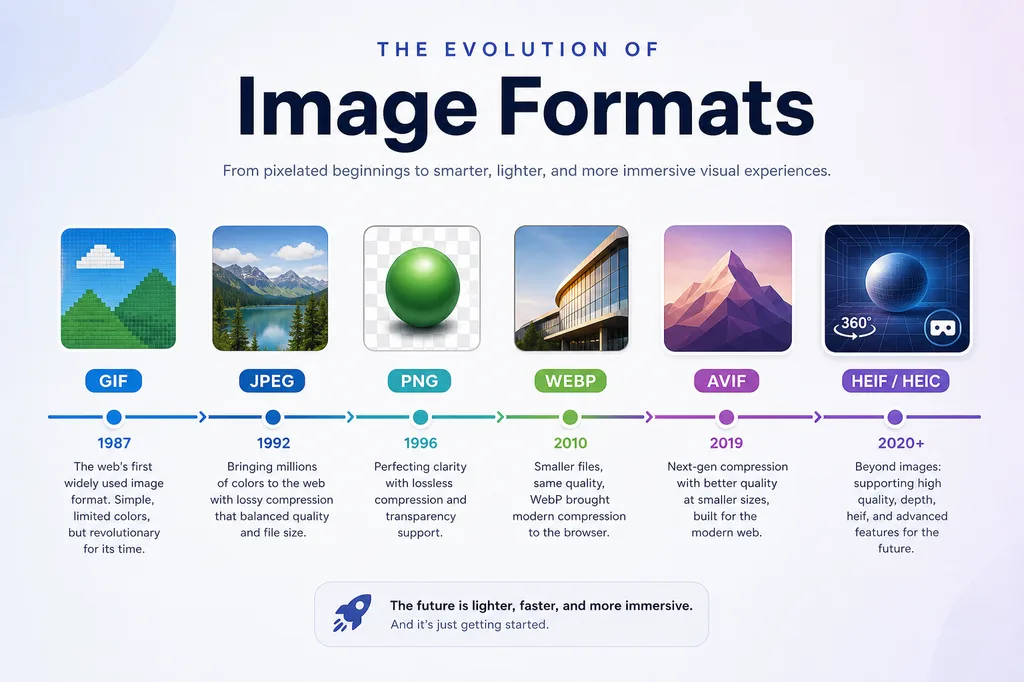
CompuServe shipped GIF in 1987. The format limits each frame to a 256-color palette but supports transparency (one key color) and frame-by-frame animation. GIF enabled early memes, banners, and GeoCities loaders.
For flat graphics, diagrams, and pixel art, GIF remains readable. For photos — no: dithering and banding destroy skin and sky. Animated GIF often weighs more than the same clip in H.264 because each frame compresses separately without inter-frame prediction.
JPEG — photos for the mass internet
JPEG (1992, ISO 10918) turned “download for an hour” into “open the page.” Losses target human vision: fine texture detail is preserved coarsely; smooth gradients more carefully. Quality 80–85 is a typical web compromise; below ~70, blocks appear on faces and sky.
JPEG has no alpha channel and no animation (except rare MJPEG for video). A logo on transparent background in JPEG is impossible — hence the PNG + JPEG pairing on most sites.
Why JPEG “won”: small files at acceptable quality, instant decode, support in every editor and camera. Known downsides — artifacts, no transparency — were acceptable for heroes and galleries for twenty years.
PNG — lossless and full transparency
PNG (1996) was a patent-free GIF alternative. Deflate lossless compression, full alpha (256 transparency levels), gamma correction. Ideal for logos, icons, screenshots, UI layers.
The price is size on photos: a 4000×3000 PNG easily exceeds 15–25 MB while JPEG fits in 2–4 MB. PNG-8 with a palette saves space for simple graphics but is less flexible than PNG-24.
The internet got faster; images got heavier
By the early 2000s the paradox was obvious: wider pipes did not make pages proportionally faster. Drivers included monitor resolution, smartphone cameras, Retina displays, and full-bleed hero blocks in design.
A 2020 phone shoots 12 MP and saves HEIC; a designer drops a 4000 px “original” into <img width="400">. The browser still downloads extra megapixels without srcset and server-side resize. Format is half the optimization; correct dimensions and lazy load are the other half (see the Next.js speed checklist).
Mobile data added latency and caps. Google folded LCP into Core Web Vitals — largest contentful paint often lands on a hero image. A 30% byte win from AVIF over JPEG improves the metric without redesign.
Modern formats: WebP, HEIC, AVIF, and JPEG XL
WebP — Google’s first serious unified attempt
Google introduced WebP in 2010, building on VP8. One container covers lossy and lossless, alpha, and animation. On typical photos WebP is ~25–35% smaller than JPEG at similar SSIM; lossless WebP is often ~20–30% smaller than PNG.
Browser support since the early 2020s is effectively complete (Safari 14+). WebP became the “safe next step” after JPEG: Cloudflare, Imgix, and Vercel Image Optimization serve WebP by default.
Downsides: lossless encoding is slower than PNG; WebP animation is not always better than video; at very low quality some scenes look different from JPEG — A/B critical banners if needed.
HEIC and HEIF — the camera format, not the website format
High Efficiency Image Container (HEIF), often with HEVC (H.265) inside, is Apple’s default for iPhone photos since iOS 11. .heic files are smaller than JPEG at similar quality, with depth, Live Photo bursts, and HDR metadata.
On the web HEIC is awkward: HEVC patents, weak desktop Chrome/Firefox support, friction for Windows users without converters. The working pattern is convert uploads to JPEG/WebP/AVIF on the server — do not serve HEIC directly.
AVIF — efficiency leader in 2026
AVIF (2019) wraps AV1 frames — the open successor to VP9. On photos AVIF is often 20–50% smaller than WebP and 30–60% smaller than JPEG at comparable quality (encoder-dependent). HDR (PQ/HLG), wide gamut, lossless, and animation are supported.
Chrome, Firefox, and Safari 16+ decode AVIF; older clients need <picture> fallbacks:
<picture>
  <source srcset="hero.avif" type="image/avif" />
  <source srcset="hero.webp" type="image/webp" />
  <img src="hero.jpg" alt="…" width="1200" height="630" loading="lazy" />
</picture>
Downsides: slow encoding (libaom, rav1e — tune speed presets); AVIF decode is heavier than JPEG on old Android; some CMS pipelines still skip AVIF generation.
JPEG XL — potential without mass victory
JPEG XL (ISO/IEC 18181, finalized ~2021) was designed as a true JPEG replacement: lossy and lossless in one file, progressive decode, lossless recompression from JPEG, HDR, alpha, animation. Decode was meant to be faster than AVIF.
Apple did not adopt JXL in Safari; Chrome’s experiment closed. In 2026 JPEG XL is for enthusiasts, archives, and tools (Squoosh, XnConvert), not default CDN output. Watch the space: Safari support would rebalance the field — AVIF leads adoption; JXL leads theoretical decode speed.
Reference comparison (facts repeated in prose; table is a cheat sheet):
| Format | Compression | Transparency | Animation | Typical role |
|---|---|---|---|---|
| JPEG | Lossy | No | No | Photos, fallback |
| PNG | Lossless | Yes | No | UI, screenshots |
| WebP | Both | Yes | Yes | Default web |
| HEIC | Lossy | Yes | Limited | iPhone camera |
| AVIF | Both | Yes | Yes | Modern web |
| JPEG XL | Both | Yes | Yes | Archive, future |
JPEG remains compatibility insurance; PNG when edges must be perfect; WebP is the CDN sweet spot; AVIF maximizes byte savings on photos; HEIC is a phone original, not a site asset; JPEG XL stays on the watch list.
SVG and when vectors beat raster
SVG does not compete with AVIF on photos but covers another class: logos, icons, diagrams, simple illustrations. It scales without blur, weighs kilobytes, styles with CSS, animates with SMIL/CSS/JS.
Photos inside SVG <image> do not win. Rule for 2026: icons and logos — SVG; photos — AVIF/WebP/JPEG; screenshots with tiny text — PNG or lossless WebP.
Inline SVG helps accessibility and SEO with <title> and role="img". For sprites, consider <use href="#icon-id">.
Which format to choose in 2026
Photos and hero blocks
Primary: AVIF (quality 45–55 in many encoders ≈ JPEG 80). Fallback: WebP, then JPEG. Generate three variants at build or via image CDN. Do not serve 3000 px when CSS shows 800 px — resize savings often beat codec switches.
Logos, UI, screenshots
SVG for simple shapes. PNG for pixel-perfect raster or complex compositions. Lossless WebP where browsers allow. Avoid JPEG for text — letter artifacts are unacceptable.
Animation
Replace GIF with short loop video (<video autoplay muted loop playsinline>) — often 5–10× smaller. WebP/AVIF animation fits simple loaders. Complex motion: Lottie or CSS.
Archive and masters
PNG or TIFF for lossless masters. JPEG XL if your toolchain supports it and you accept migration risk. Do not store the only copy as HEIC without a converter path.
Serving images on production sites
Format without delivery discipline wastes effort. Minimum checklist for Astro, Next.js, or static sites:
Responsive images. srcset and sizes (or framework <Image>) tell the browser which file to fetch. Without them, mobile downloads desktop assets.
Lazy loading. loading="lazy" below the fold; fetchpriority="high" and no lazy for LCP heroes — otherwise Largest Contentful Paint suffers.
CDN and on-the-fly transforms. Cloudinary, imgproxy, Thumbor, host optimizers — one original, many formats via Accept: image/avif,image/webp,*/*.
Caching. Long Cache-Control on hashed URLs (hero.a1b2c3.avif). Change hash when the image changes.
Width/height. Explicit dimensions prevent CLS. Astro and Next Image handle this when dimensions are known.
Blog covers on stuzhuk.page use WebP under /assets/img/blog/; apply the same pattern to your project.
Typical developer mistakes
One original for every context. Uploading 6000×4000 JPEG and resizing only in CSS is the top cause of heavy pages. Cut on server or at build.
PNG for all icons. A 512×512 PNG at 80 KB where SVG is 2 KB. Check DevTools → Network.
AVIF without fallback. Old Safari and embedded WebViews break if <img src> points only to .avif.
GIF for long animation. A three-second meme is tolerable; a 30-second product demo needs video.
Ignoring alt. Empty alt="" for decorative images; meaningful alt for content photos — SEO and a11y.
Re-encoding JPEG→JPEG. Each save adds loss. Store a lossless or max-quality JPEG master once.
The future of image formats
HDR becomes normal: bright displays and AVIF/JXL with PQ transfer already exist; content pipelines catch up. Formats borrow more from video codecs (AV1, future AV2) — shared encoder ecosystems for video and stills.
AI compression (neural codecs, decode-time super-resolution) is mostly research and proprietary CDN today but may reach mass-market tools in 3–5 years. Expect hybrids: classic codec plus client-side enhancement.
JPEG as legacy — like MP3 in audio: lowest common denominator for another decade. New formats live in <picture>, not instant replacement in camera EXIF.
Watch JPEG XL in Safari and production-speed AVIF encoders (SVT-AV1, libavif presets).
FAQ
How is AVIF better than WebP?
AVIF uses AV1 and is typically 20–50% smaller than WebP at similar visual quality, with stronger HDR support. WebP encodes faster and decodes slightly easier on very weak CPUs. Use both in a <picture> cascade.
Should I still use JPEG?
Yes — as the final <picture> fallback, for email clients, legacy apps, and social uploads that re-encode. JPEG remains the “opens everywhere” exchange format.
Why does iPhone save HEIC but my site does not?
Apple optimized local storage with HEVC. The web avoids HEIC because of patents and fragmented browser support. Convert on upload or in share flows.
PNG or lossless WebP for screenshots?
On modern browsers, lossless WebP is often ~25% smaller than PNG at identical pixels. For maximum doc compatibility — PNG. Internal dev tools — WebP.
What quality for AVIF and WebP?
Encoder-dependent. For libaom AVIF start around cq 30–45; for cwebp quality 75–85. Compare visually on Retina, not only by number.
Will JPEG XL replace AVIF?
Not yet. AVIF won browser adoption; JPEG XL wins on theoretical decode speed and painless JPEG migration. Watch Safari and Chrome roadmaps.
Should I still ship GIF in 2026?
Only when email or legacy chat needs maximum compatibility. On sites — video loop or CSS. Export GIF for platforms that reject video.
How do formats relate to Core Web Vitals?
LCP is often a large above-the-fold image. Smaller AVIF/WebP and correct srcset speed download; explicit width/height reduce CLS. INP rarely depends on decode, but heavy AVIF galleries on weak phones can block the main thread — virtualize long galleries.
Further reading
Related deep dives on stuzhuk.page:
- Next.js instant-load checklist —
next/image, AVIF/WebP, LCP - Eight JavaScript performance fixes in 2026
- SEO, AEO, GEO, and AISO
- Why the site was rebuilt with Astro
- Modern stack with Vite
External: Can I use — AVIF, web.dev — Choose the right image format, AVIF spec (AOM).
Conclusion
Format history is a history of trade-offs: BMP brought simplicity and gigabytes; GIF and PNG split animation and transparency; JPEG made photos mass-market; WebP, HEIC, AVIF, and JPEG XL fight for every kilobyte in a mobile-first era. In 2026, winners build a format cascade, responsive delivery, and honest fallbacks — not the newest codec alone.
This week: audit your homepage hero — AVIF/WebP present, correct sizes, JPEG fallback, fixed dimensions. That single pass often beats switching frameworks.