


Contents
A courier carries a parcel in two boxes of different sizes. Everything fits at the warehouse; at the customer's door it does not — the edges had to be crushed. A neural network has the same trap: in training the image was "fitted" one way, in production slightly another, and the model quietly loses quality even though the weights are the same. This lesson does not teach reading digits. It agrees on one box for every model in the course.
In lesson 1 we set up the lab and fixed the seed. Today is the next layer of Train CNN and CRNN from scratch: image → tensor.
A network does not see a picture the way an eye does. A PNG on disk is a compressed file of pixels; for the network that format is too "human." At the input it needs a table of numbers: each pixel is one brightness value. In code such a table is called an array (in NumPy an ndarray, in PyTorch a tensor; for this lesson the words "array" and "tensor" are almost synonyms: a table of numbers with a known shape).
The lesson's job is to agree on one format for that table for every model in the course. Each cell crop becomes an array of shape [1, 48, 160]: not "a list of three numbers," but a three-dimensional table of size 1 × 48 × 160 — 1 × 48 × 160 = 7680 numbers in all, one per input "pixel."
The type float32 is how those numbers are stored in memory. It is a 32-bit floating-point number: you can store not only 0 and 1 but also 0.06, 0.77, 0.98. Raw image bytes (0…255, a type like uint8) are awkward for training: networks compute gradients and weights in fractions. So after preparation we divide brightness by 255 and get values roughly in [0, 1] as float32. In the course contract: background (paper and padding) is about 0, stroke (ink) is closer to 1.
Shape [1, 48, 160] reads as channel × height × width — how images usually sit in PyTorch. The leading 1 is one brightness channel (grayscale), not RGB. Then 48 rows and 160 columns. In Pillow you often think "width × height" or "height × width × channels"; here the order is different. Swap axes and the network sees "flipped" geometry; shape tests for (1, 48, 160) will fail at once.
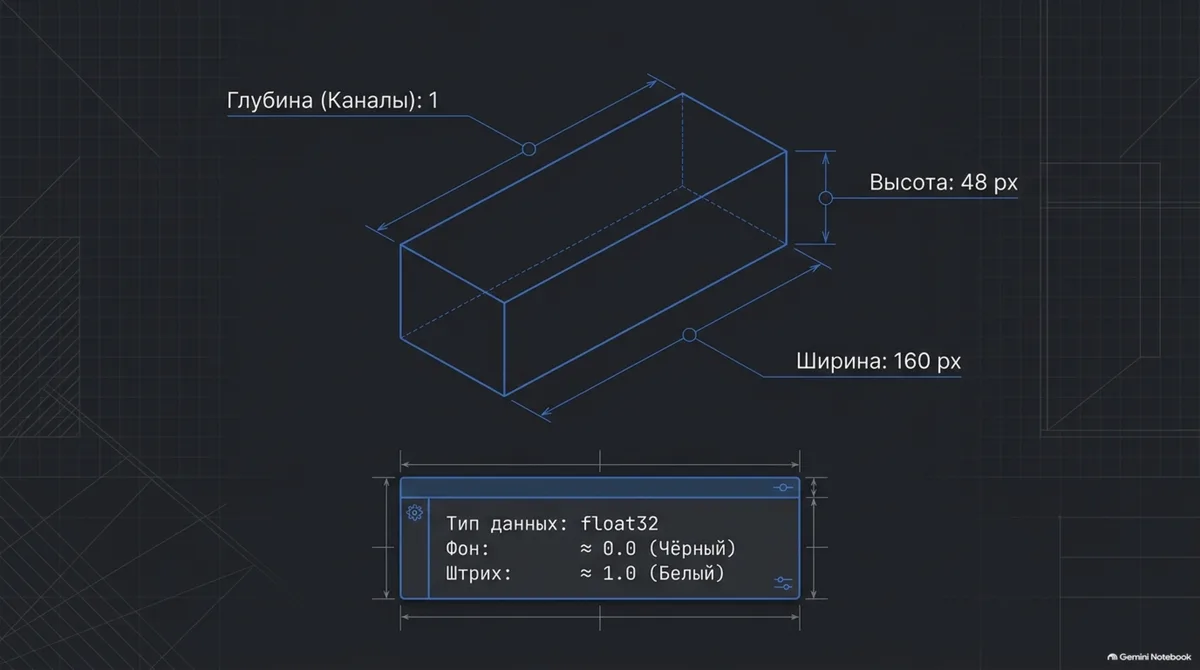
Why agree ahead of time? Both the CNN from lesson 7 and the CRNN from lesson 11 will get the same thing at the input. If preprocessing in training and in production differs even slightly, the model quietly loses quality and finding the cause later is very hard. So all image preparation lives in one file.
The word contract here is literal: this is not "nice preprocessing," but a promise to the rest of the course. Any future model may assume the input is already [1, 48, 160], float32, background near zero, stroke near one. Break the promise in one place and training, production, and experiment comparison all break.
Four steps: gray → contrast → letterbox → inversion
Before the first model (the detector appears only in lessons 7–9), the image goes through four mandatory transforms. Together they are the contract. The code below repeats them in order; here is what each word in the lesson title means.
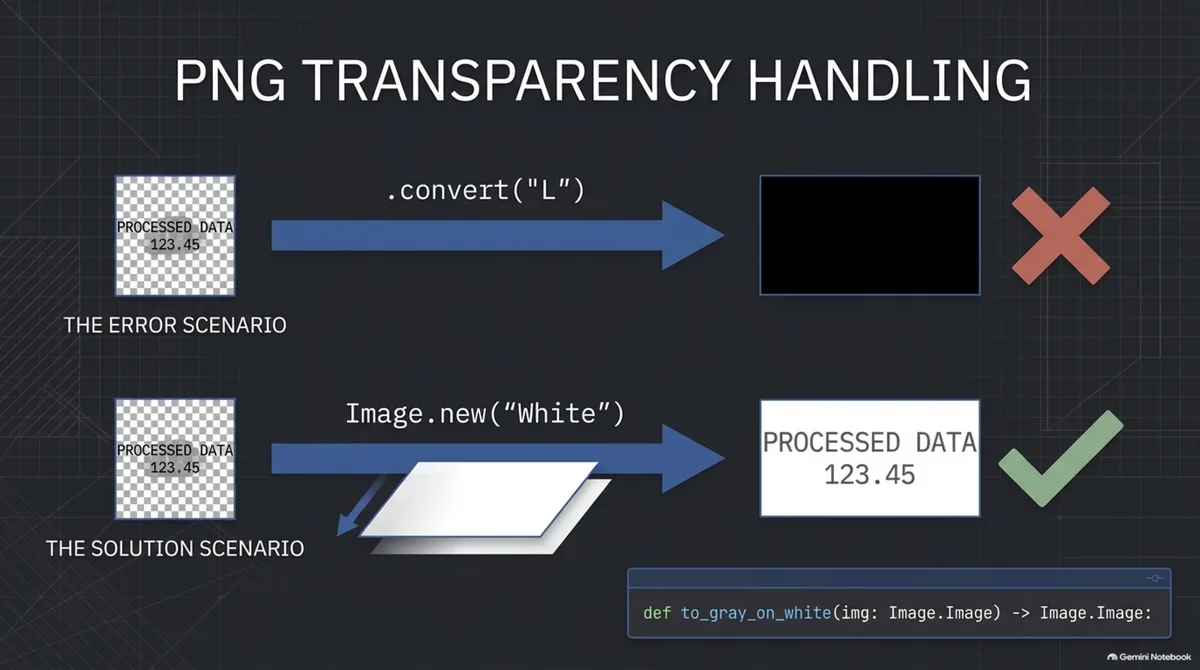
1. Gray. Color is useless for a form cell: the digit is read from stroke brightness on paper. Three RGB channels triple the input and teach the network extra scanner tints. We keep one brightness channel (L in Pillow): each number is "how light is this pixel," from 0 (black) to 255 (white). Separately we fix transparent PNGs: an "empty" pixel often stores black with zero opacity — without a white backing the gray background turns into a blob of ink.
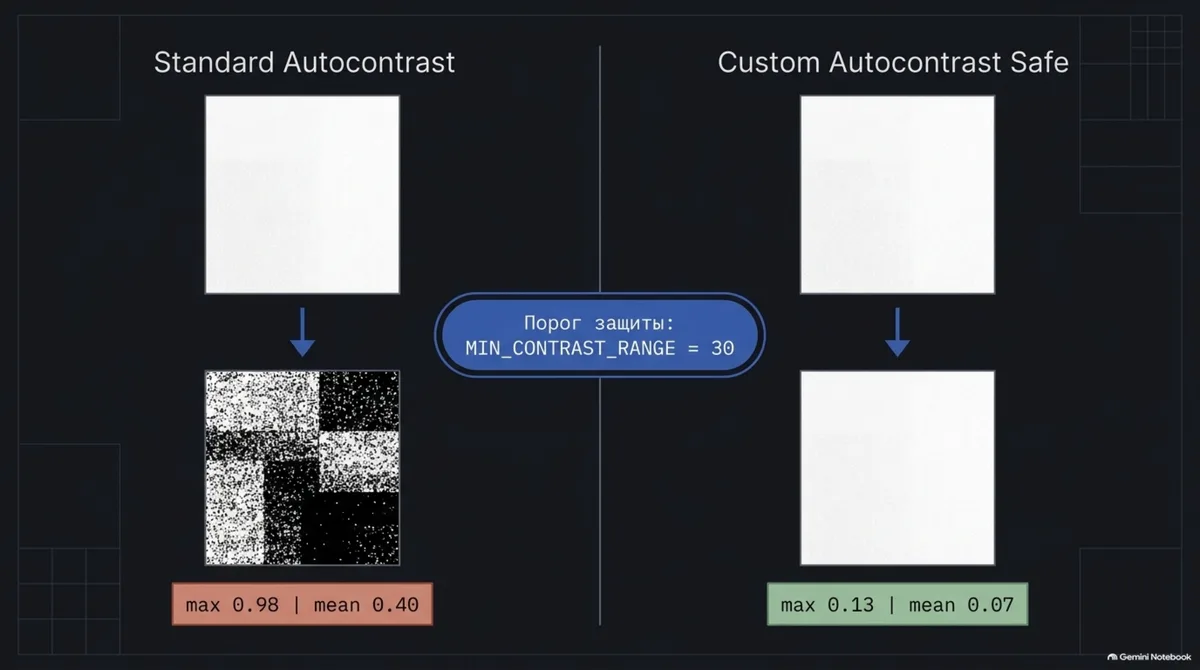
2. Contrast. Scans and synthetic crops can be dull: gray ink, gray paper, little difference. Contrast stretch spreads that corridor toward 0…255 so a dim crop does not look unlike a bright one. But on an empty cell there is nothing to stretch — only paper noise. Ordinary autocontrast would turn noise into "text"; we use autocontrast_safe with a threshold: almost uniform crops are left alone.
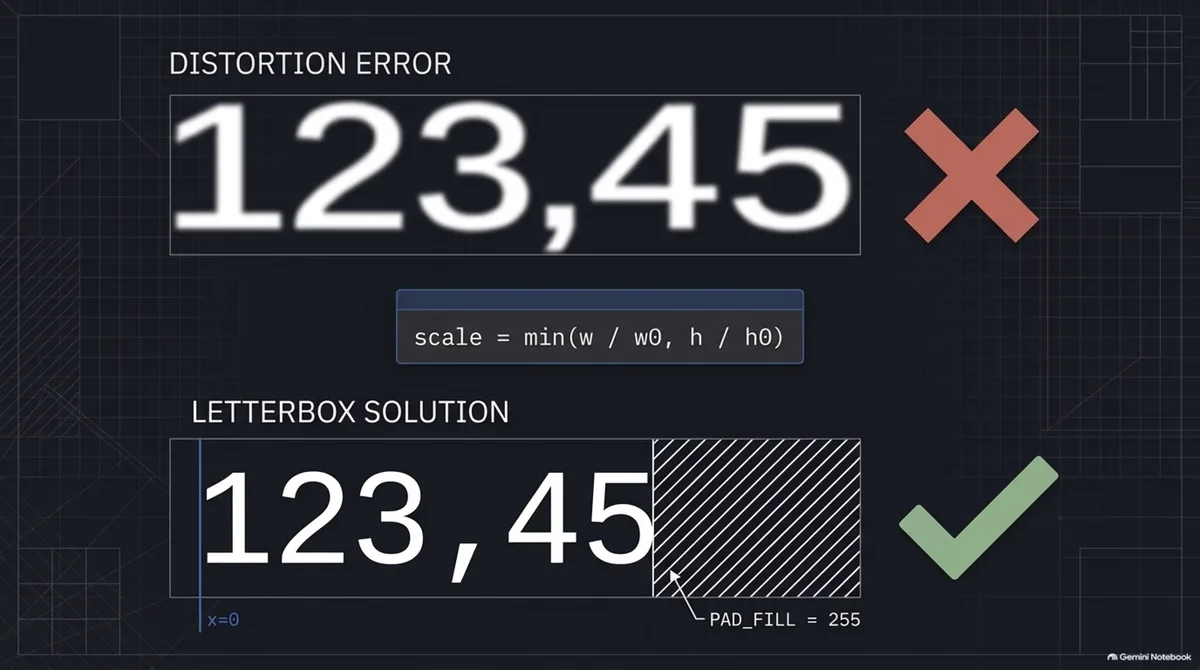
3. Letterbox. Crops arrive in different sizes: a narrow 7, a wide 123,45. The network needs one size — a 48×160 canvas. Letterbox is like black bars on a wide screen: the picture is fitted whole, proportions are not broken, empty space is filled with background. The alternative — stretch to 48×160 — squashes digits. We scale with scale = min(…), align text to the left, center vertically.
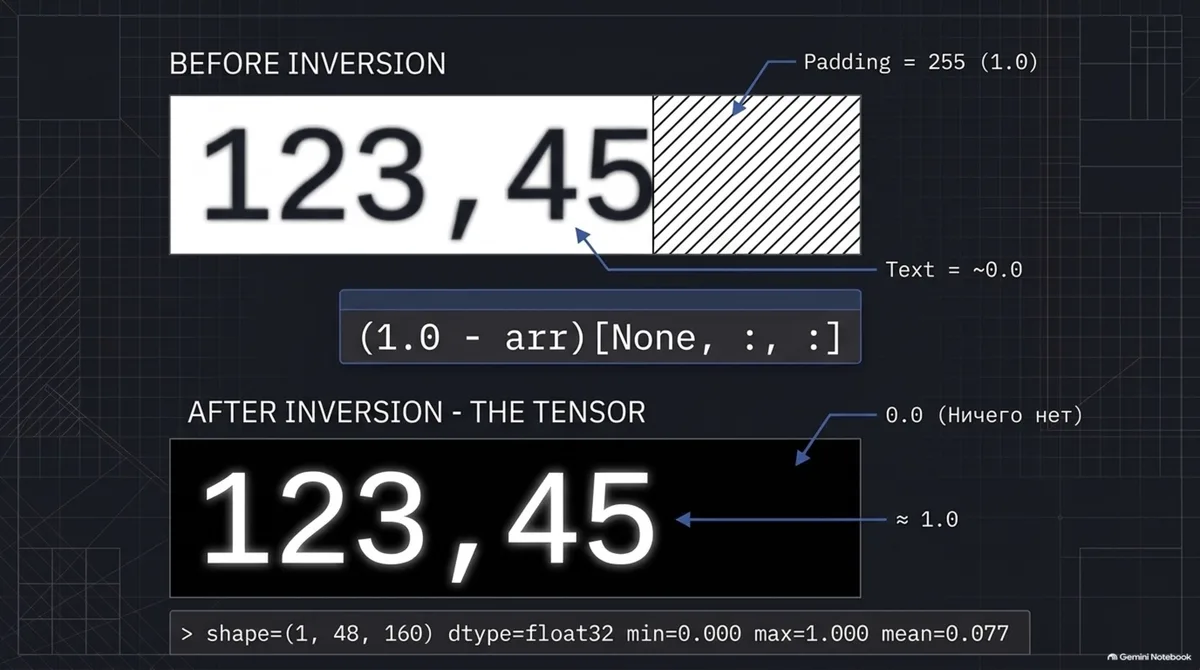
4. Inversion. Until then the canvas looks like paper: white background, dark ink. After dividing by 255 paper is near 1 and stroke near 0. The ink the model should notice ends up as small numbers, white padding as large ones. Inversion 1 − value flips the scale: stroke ≈ 1, background and padding ≈ 0. Empty canvas and ink-free regions give the model the same value — zero.
After these four steps the output is a tensor of shape [1, 48, 160] with dtype float32 — the input the course contract promises. Every later model will take exactly that.
Files in this lesson
src/image_to_tensor.py— preprocessing: gray → contrast → fit on 48×160 canvas → inversion.src/make_demo_crops.py— helper script: draws 9 demo crops of different sizes (digits and empty cells). The full generator comes in lesson 4.experiments/show_preprocess_grid.py— helper script: grid "source | canvas | tensor."tests/test_image_to_tensor.py— contract tests.
Reference for comparison if something fails: lesson-02. You do not need to clone it: you add this lesson's files to your repository from lesson 1 and commit.
Predict
"Predict" is not a grade. Before you run anything you fix an expectation: tensor shape, padding value after inversion, what happens to an empty cell when contrast is stretched. After the commands you compare the forecast with the terminal and the grid. A mismatch here is worth more than a match: you see where intuition about images was wrong.
Before you run, write the answers:
- What shape and dtype will the result have?
- After inversion, will padding (empty space we add to reach 48×160) be 0 or 1?
- What happens to an empty cell if you "stretch" its contrast to the 0–255 range?
Setup and demo crops
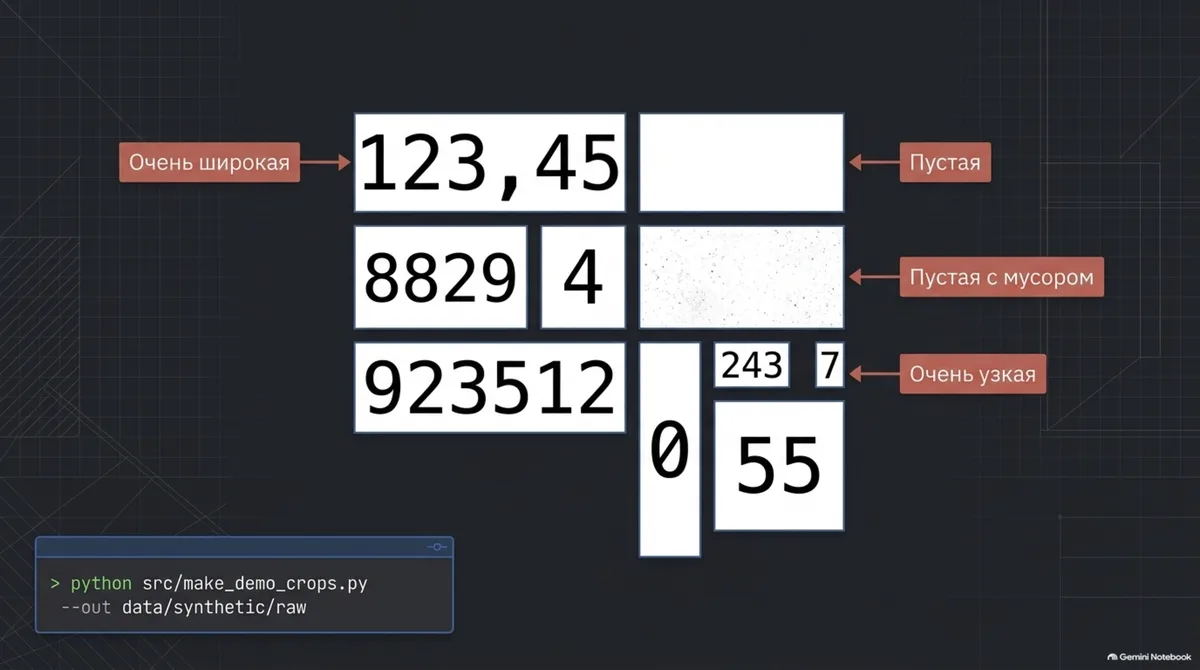
Environment and repository — from lesson 1. First type src/make_demo_crops.py in your repository — a short script that draws nine demo crops of different sizes. It is not the preprocessing core, but material to check letterbox and contrast protection. The full data generator appears in lesson 4.
src/make_demo_crops.py
"""Несколько искусственных кропов для уроков 2–3 (полный генератор будет в уроке 4)."""
import argparse
from pathlib import Path
import numpy as np
from PIL import Image, ImageDraw, ImageFont
# (текст, часть имени файла, ширина, высота)
SAMPLES = [
("7,3", "7_3", 120, 40),
("12/14", "12_14", 200, 50),
("0,85", "0_85", 150, 60),
("105", "105", 90, 45),
("1-2", "1-2", 100, 40),
("123,45", "123_45", 380, 70), # очень широкий
("7", "7", 40, 50), # очень узкий
("", "empty", 120, 45), # пустая клетка
("", "empty_noisy", 140, 45), # пустая клетка с мусором
]
def get_font(size: int):
try:
return ImageFont.load_default(size=size)
except Exception: # старый Pillow или нет FreeType
return ImageFont.load_default()
def draw_crop(text: str, w: int, h: int, rng: np.random.Generator, noisy: bool) -> Image.Image:
paper = rng.integers(225, 256)
arr = rng.normal(paper, 3.0, size=(h, w)).clip(0, 255).astype(np.uint8)
img = Image.fromarray(arr, mode="L")
draw = ImageDraw.Draw(img)
if text:
pad = int(rng.integers(6, 13))
size = int(h * 0.6)
font = get_font(size)
bbox = draw.textbbox((0, 0), text, font=font)
while bbox[2] - bbox[0] > w - 2 * pad and size > 8:
size -= 2
font = get_font(size)
bbox = draw.textbbox((0, 0), text, font=font)
ink = int(rng.integers(20, 70))
x = pad - bbox[0]
y = (h - (bbox[3] - bbox[1])) // 2 - bbox[1]
draw.text((x, y), text, fill=ink, font=font)
if noisy:
draw.line([(0, h - 4), (w, h - 4)], fill=150, width=1) # край клетки
for _ in range(6): # пятнышки
cx, cy = int(rng.integers(0, w)), int(rng.integers(0, h))
draw.ellipse([cx, cy, cx + 2, cy + 2], fill=int(rng.integers(90, 160)))
return img
def main() -> None:
ap = argparse.ArgumentParser()
ap.add_argument("--out", default="data/synthetic/raw")
ap.add_argument("--seed", type=int, default=42)
args = ap.parse_args()
out = Path(args.out)
out.mkdir(parents=True, exist_ok=True)
rng = np.random.default_rng(args.seed)
for text, name, w, h in SAMPLES:
img = draw_crop(text, w, h, rng, noisy=name.endswith("noisy"))
path = out / f"sample_{name}.png"
img.save(path)
print(f"{path} ({w}x{h}) text={text!r}")
if __name__ == "__main__":
main()The SAMPLES list sets text and size for each crop: a wide string, a narrow seven, two empty cells. draw_crop draws paper noise and, when needed, digits or clutter on an empty cell. Default seed --seed 42 so everyone gets the same files.
Then generate demo crops from the repository root:
python src/make_demo_crops.py --out data/synthetic/rawSample output on tag lesson-02:
data/synthetic/raw/sample_7_3.png  (120x40)  text='7,3'
data/synthetic/raw/sample_12_14.png  (200x50)  text='12/14'
data/synthetic/raw/sample_0_85.png  (150x60)  text='0,85'
data/synthetic/raw/sample_105.png  (90x45)  text='105'
data/synthetic/raw/sample_1-2.png  (100x40)  text='1-2'
data/synthetic/raw/sample_123_45.png  (380x70)  text='123,45'
data/synthetic/raw/sample_7.png  (40x50)  text='7'
data/synthetic/raw/sample_empty.png  (120x45)  text=''
data/synthetic/raw/sample_empty_noisy.png  (140x45)  text=''
The folder gets nine PNGs of different width and height: 7,3, 12/14, 0,85, 105, 1-2, very wide 123,45, very narrow 7, and two empty cells (one with noise). Sizes differ on purpose: that is what preprocessing must handle.
Code: type it yourself
make_demo_crops.py is already above. Next type the core image_to_tensor.py and the tests; the grid script is in the next section. If output does not match, compare with tag lesson-02.
src/image_to_tensor.py
"""Картинка → тензор: единый контракт входа для моделей курса (1×48×160).
Ядро написано на NumPy, чтобы его можно было проверять без PyTorch;
в тензор превращает тонкая обёртка image_to_tensor().
"""
import argparse
import numpy as np
from PIL import Image, ImageOps
CANVAS_H = 48
CANVAS_W = 160
PAD_FILL = 255 # фон холста: белая бумага (после инверсии станет 0)
MIN_CONTRAST_RANGE = 30 # если в кропе меньше 30 уровней яркости, контраст не растягиваем
def load_image(source) -> Image.Image:
"""Принимает путь или готовый PIL-образ."""
if isinstance(source, Image.Image):
return source # уже открытый образ (тесты, Dataset)
return Image.open(source) # путь к файлу
def to_gray_on_white(img: Image.Image) -> Image.Image:
"""В оттенки серого; прозрачность подкладывается на белый фон."""
has_alpha = img.mode in ("RGBA", "LA") or (img.mode == "P" and "transparency" in img.info)
if has_alpha:
rgba = img.convert("RGBA")
white = Image.new("RGBA", rgba.size, (255, 255, 255, 255)) # белая подложка
img = Image.alpha_composite(white, rgba) # иначе прозрачность станет чёрной
return img.convert("L") # один канал яркости
def autocontrast_safe(img: Image.Image, min_range: int = MIN_CONTRAST_RANGE) -> Image.Image:
"""Растягивает контраст, но не трогает почти однородные кропы.
Пустая клетка почти однородна. Если растянуть её контраст до 0..255,
шум бумаги превратится в «текст».
"""
lo, hi = img.getextrema() # мин/макс яркости в кропе
# stubs Pillow: для RGB extrema — кортеж пар; для L — (lo, hi).
if not isinstance(lo, (int, float)) or not isinstance(hi, (int, float)):
raise TypeError(f"нужен одноканальный L, режим={img.mode!r}")
if hi - lo < min_range:
return img # почти однородно: не раздуваем шум бумаги
return ImageOps.autocontrast(img) # растягиваем контраст до 0..255
def letterbox(img: Image.Image, h: int = CANVAS_H, w: int = CANVAS_W,
fill: int = PAD_FILL) -> Image.Image:
"""Вписывает картинку в холст h×w без искажения пропорций.
По горизонтали прижимаем влево (текст начинается всегда с одного места),
по вертикали центрируем. Остаток холста заливаем фоном.
"""
w0, h0 = img.size
scale = min(w / w0, h / h0) # вписать целиком, без растяжения
new_w = max(1, round(w0 * scale))
new_h = max(1, round(h0 * scale))
resized = img.resize((new_w, new_h), Image.Resampling.LANCZOS)
canvas = Image.new("L", (w, h), fill) # белый холст 48×160
canvas.paste(resized, (0, (h - new_h) // 2)) # влево + по вертикали центр
return canvas
def preprocess_array(source) -> np.ndarray:
"""Путь или PIL-образ → float32-массив [1, 48, 160]: фон ≈ 0, штрих ≈ 1."""
img = load_image(source)
if min(img.size) == 0:
raise ValueError("пустое изображение (нулевой размер)")
gray = to_gray_on_white(img)
gray = autocontrast_safe(gray)
canvas = letterbox(gray)
arr = np.asarray(canvas, dtype=np.float32) / 255.0 # [0, 1], бумага ≈ 1
return (1.0 - arr)[None, :, :] # инверсия: штрих ≈ 1, паддинг = 0; канал впереди
def image_to_tensor(source):
"""То же, но в виде torch.Tensor."""
import torch # импорт здесь: ядро выше не требует torch
return torch.from_numpy(preprocess_array(source))
def main() -> None:
ap = argparse.ArgumentParser(description="Показать результат препроцессинга одного кропа")
ap.add_argument("--image", required=True)
args = ap.parse_args()
arr = preprocess_array(args.image)
zero_cols = int((arr[0].max(axis=0) == 0).sum()) # столбцы чистого паддинга
print(f"shape={arr.shape} dtype={arr.dtype} "
f"min={arr.min():.3f} max={arr.max():.3f} mean={arr.mean():.3f}")
print(f"полностью нулевых столбцов (паддинг): {zero_cols} из {arr.shape[2]}")
if __name__ == "__main__":
main()The functions in order.
load_image. Takes a path or a ready PIL image. One function for tests and the future Dataset.
to_gray_on_white. This is the "gray" step from the map above. One brightness channel: color dropped, only lighter/darker. Transparency matters: PNG with transparent background stores "empty" pixels as black with zero opacity. A plain convert("L") makes the background black and the model thinks the whole image is ink. We put white backing first — paper under a film with holes.
autocontrast_safe. This is the "contrast" step. Stretches brightness so dim crops match bright ones: darkest pixel toward 0, lightest toward 255, middle stretched proportionally. But there is a guard. An empty cell is almost uniform: only light paper noise. Ordinary autocontrast would stretch that noise across 0–255 and the cell becomes "text." On demo crop empty without protection max after preprocessing is 0.98 with mean 0.40; with protection — 0.13 with mean 0.07. That matters: in a few lessons we train a detector to tell empty from filled cells, and we must not feed empty cells turned into noise. Threshold MIN_CONTRAST_RANGE = 30 is our choice; more on its cost in "Not yet."
Roughly: suppose brightness in the crop sits in a narrow band, say 230 to 245 (hi − lo = 15). Ordinary autocontrast maps 230 → 0 and 245 → 255: gray paper noise becomes contrasty "art." The guard looks at hi − lo: below 30 — leave the crop alone. Real text with pale but visible ink usually spans more than the threshold and stretches as intended.
letterbox. This is the "fit on canvas" step. The name is from video: the picture goes on a fixed frame so it fits whole and empty fields are filled with background. Stretching a wide crop to 48×160 would squash letters; the model should read normal proportions. So we scale with aspect ratio kept and pad the rest with background (PAD_FILL = 255, white "paper"). Horizontally align left (text always starts in one place), vertically center.
Numbers for demo crop 7,3 at 120×40: scale = min(160/120, 48/40) = min(1.333…, 1.2) = 1.2. New image ≈ 144×48 — height exactly fits, width leaves a strip of 160 − 144 = 16 columns. That is what the CLI prints: "fully zero columns … 16 of 160." For narrow 7 (40×50) canvas width limits less than height: image grows vertically to 48, stays narrow horizontally — padding on the right takes most of the frame (122 of 160). Left alignment matters early: detector and line reader will expect symbols to start at the same edge, not "float" in the center.
preprocess_array. Runs all four steps and ends with inversion: 1 - arr. Not a separate "fifth magic," but putting the canvas in contract language: background near 0, stroke near 1. Why? Padding is white (255); after inversion it is exactly 0: "empty canvas" and "no ink" match, and padding does not fake strokes. Without inversion you would zero out dark "strokes" — paper and padding would live on different scales.
The last three operations in numbers. asarray(...)/255.0 maps bytes 0…255 to fractions 0…1 (white paper ≈ 1, dark stroke ≈ 0). 1.0 - arr flips: paper → near 0, stroke → near 1. [None, :, :] adds the channel axis in front: matrix (48, 160) becomes (1, 48, 160). Without that axis you cannot stack several crops into one batch of the same shape later.
image_to_tensor. Thin wrapper: torch.from_numpy(...). torch is imported inside on purpose: everything else runs on NumPy, so the core can be tested without PyTorch.
Run on wide and narrow crops:
python src/image_to_tensor.py --image data/synthetic/raw/sample_7_3.png
python src/image_to_tensor.py --image data/synthetic/raw/sample_7.png
Sample output on tag lesson-02 (third decimal may drift slightly with Pillow version):
shape=(1, 48, 160) dtype=float32 min=0.000 max=1.000 mean=0.077
полностью нулевых столбцов (паддинг): 16 из 160

shape=(1, 48, 160) dtype=float32 min=0.000 max=1.000 mean=0.017
полностью нулевых столбцов (паддинг): 122 из 160
Shape and dtype answer the first "Predict" question. On narrow 7 padding takes most of the canvas (122 of 160 columns are exactly zero) — answer to the second: after inversion padding is 0.
How to read the CLI line. shape and dtype are the contract. min / max show values fit in [0, 1]. mean is the share of "bright" (stroke) pixels over the whole canvas: narrow 7 has a lower mean because almost the whole frame is zero padding. "Fully zero columns" counts columns whose max over height is 0: pure padding on the right with no stroke. That is not "how many pixels are zero," but whole empty columns — a handy letterbox indicator.
tests/test_image_to_tensor.py
import sys
from pathlib import Path
import numpy as np
import pytest
from PIL import Image
sys.path.insert(0, str(Path(__file__).resolve().parents[1] / "src"))
from image_to_tensor import CANVAS_H, CANVAS_W, preprocess_array # noqa: E402
def text_like(w: int, h: int, bg: int = 240, ink: int = 30) -> Image.Image:
"""Светлый фон и тёмный «штрих» посередине."""
img = Image.new("L", (w, h), bg)
img.paste(ink, (w // 4, h // 4, w // 2, 3 * h // 4))
return img
def test_shape_dtype_range():
arr = preprocess_array(text_like(200, 50))
assert arr.shape == (1, CANVAS_H, CANVAS_W)
assert arr.dtype == np.float32
assert arr.min() >= 0.0 and arr.max() <= 1.0
def test_ink_is_bright():
arr = preprocess_array(text_like(200, 50))
assert arr.max() > 0.9
def test_horizontal_padding_is_zero_for_narrow_image():
arr = preprocess_array(text_like(40, 50)) # после масштаба ширина ≈ 38
assert np.all(arr[0, :, 40:] == 0.0)
def test_vertical_padding_is_zero_for_wide_image():
arr = preprocess_array(text_like(400, 30)) # после масштаба высота ≈ 12
assert np.all(arr[0, :10, :] == 0.0)
assert np.all(arr[0, -10:, :] == 0.0)
def test_empty_crop_noise_is_not_amplified():
rng = np.random.default_rng(0)
noise = rng.normal(240, 3, size=(45, 120)).clip(0, 255).astype(np.uint8)
arr = preprocess_array(Image.fromarray(noise, mode="L"))
assert arr.max() < 0.2
def test_transparent_background_becomes_white():
img = Image.new("RGBA", (100, 40), (0, 0, 0, 0)) # полностью прозрачная картинка
arr = preprocess_array(img)
assert arr.max() < 0.01
def test_zero_size_image_raises():
with pytest.raises(ValueError):
preprocess_array(Image.new("L", (0, 10)))
def test_tensor_wrapper():
torch = pytest.importorskip("torch")
from image_to_tensor import image_to_tensor
t = image_to_tensor(text_like(200, 50))
assert tuple(t.shape) == (1, CANVAS_H, CANVAS_W)
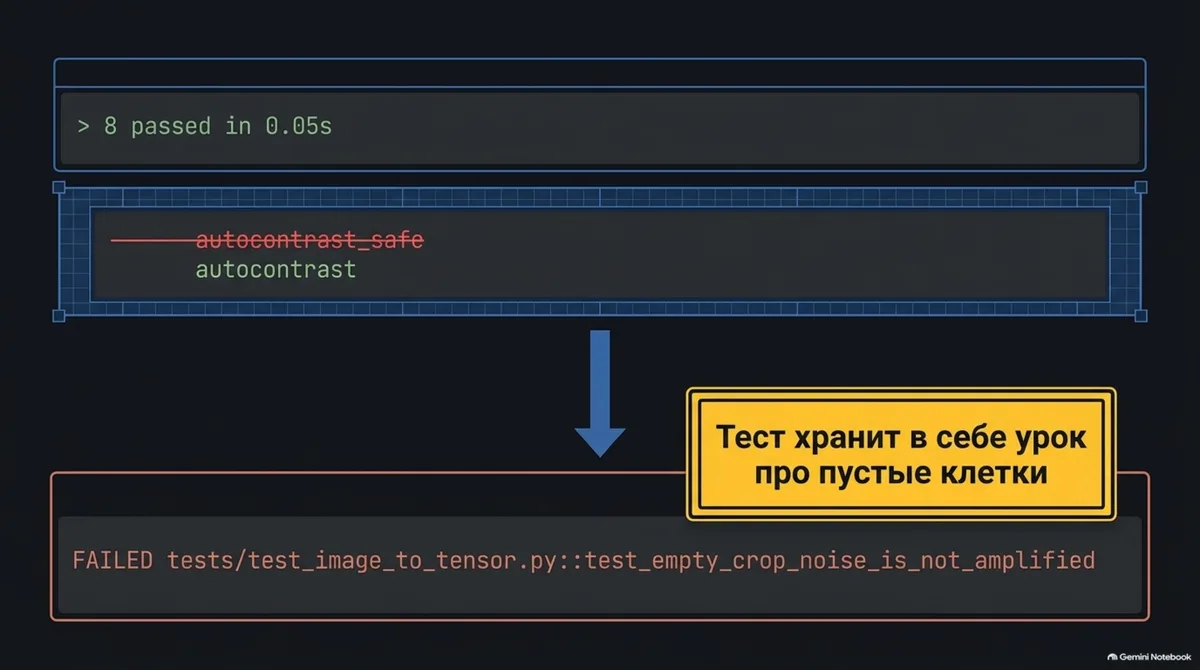
assert t.dtype == torch.float32Note test test_empty_crop_noise_is_not_amplified: replace autocontrast_safe with ordinary autocontrast and it fails. The test encodes the lesson about empty cells. Neighbor padding tests check the contract, not "prettiness": for a narrow image everything right of column 40 is exactly 0; for a wide low one top and bottom bands are zero. Letterbox and inversion are fixed in numbers, not a screenshot.
Grid and tests
Demo crops and CLI on 7,3 / 7 you already ran above. Next in order: grid script → image → pytest.
experiments/show_preprocess_grid.py
"""Сетка «исходник | холст до инверсии | тензор» для всех кропов в папке."""
import argparse
import sys
from pathlib import Path
import matplotlib
import numpy as np
matplotlib.use("Agg")
import matplotlib.pyplot as plt # noqa: E402
sys.path.insert(0, str(Path(__file__).resolve().parents[1] / "src"))
from image_to_tensor import ( # noqa: E402
autocontrast_safe, letterbox, load_image, preprocess_array, to_gray_on_white,
)
def main() -> None:
ap = argparse.ArgumentParser()
ap.add_argument("--dir", default="data/synthetic/raw")
ap.add_argument("--out", default="experiments/preprocess_grid.png")
args = ap.parse_args()
paths = sorted(Path(args.dir).glob("*.png"))
if not paths:
sys.exit(f"В {args.dir} нет PNG. Сначала: python src/make_demo_crops.py")
fig, axes = plt.subplots(len(paths), 3, figsize=(10, 1.25 * len(paths) + 0.6))
for row, path in enumerate(paths):
raw = load_image(path)
gray = to_gray_on_white(raw)
canvas = letterbox(autocontrast_safe(gray))
tensor = preprocess_array(path)[0]
axes[row, 0].imshow(np.asarray(gray), cmap="gray", vmin=0, vmax=255)
axes[row, 1].imshow(np.asarray(canvas), cmap="gray", vmin=0, vmax=255)
axes[row, 2].imshow(tensor, cmap="gray", vmin=0, vmax=1)
axes[row, 0].set_ylabel(path.stem.replace("sample_", ""), rotation=0,
ha="right", va="center", fontsize=8)
for ax in axes[row]:
ax.set_xticks([])
ax.set_yticks([])
for col, title in enumerate(["исходник", "холст 48×160 (до инверсии)", "тензор (штрих = светлый)"]):
axes[0, col].set_title(title, fontsize=9)
out = Path(args.out)
out.parent.mkdir(parents=True, exist_ok=True)
fig.tight_layout()
fig.savefig(out, dpi=110)
print(f"сохранено: {out}")
if __name__ == "__main__":
main()For each PNG in the folder the script draws three columns: gray source, 48×160 canvas before inversion, and final tensor. Type the file under experiments/, then run in order:
python experiments/show_preprocess_grid.py --out experiments/preprocess_grid.png
python -m pytest tests/test_image_to_tensor.py -q
Expected output on tag lesson-02:
сохранено: experiments/preprocess_grid.png
........                                                                 [100%]
8 passed in 1.48s
If torch is not installed, the wrapper test is skipped — normal for the NumPy core; return to the environment in lesson 1.
What to expect
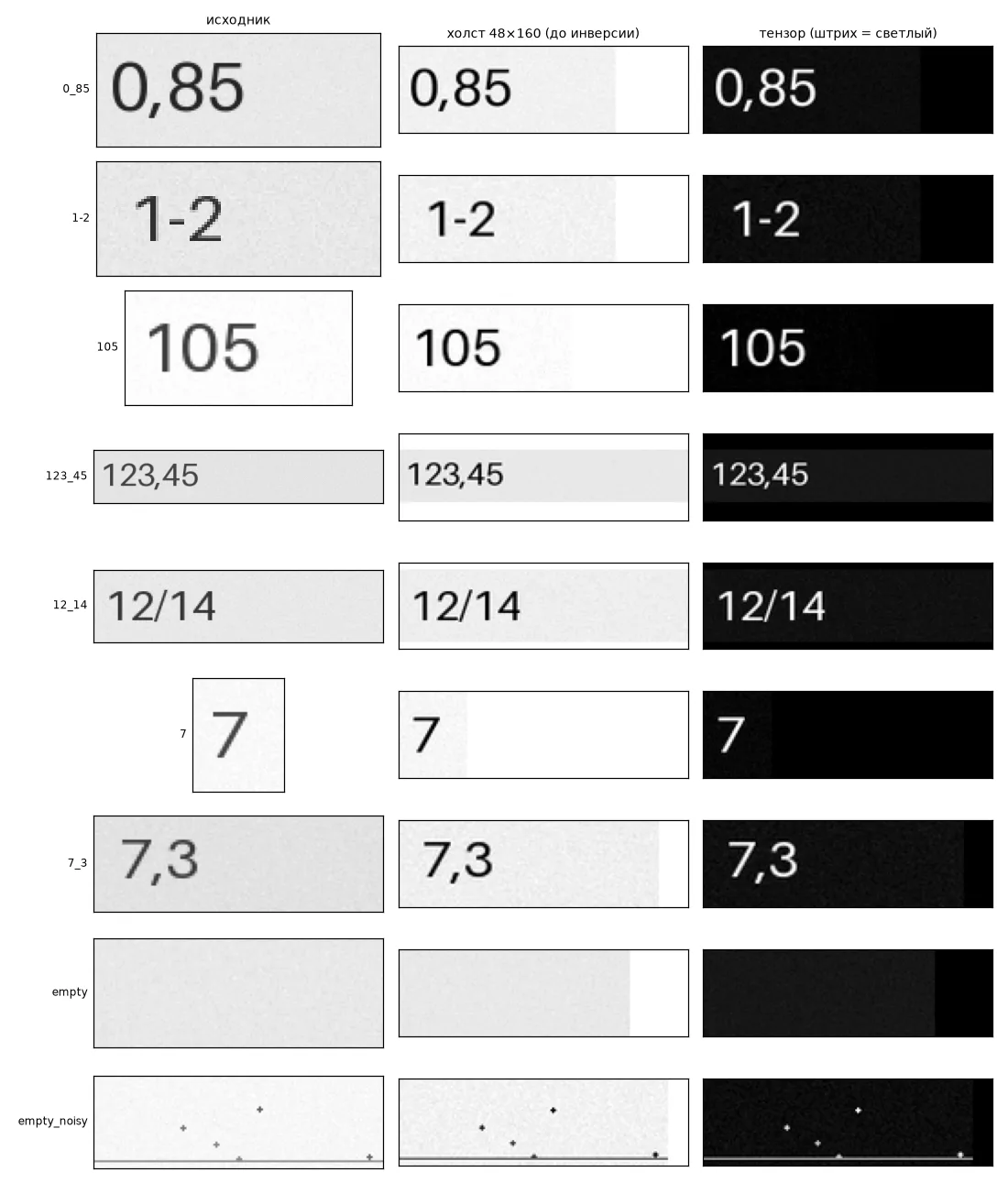
The grid you get in experiments/preprocess_grid.png:
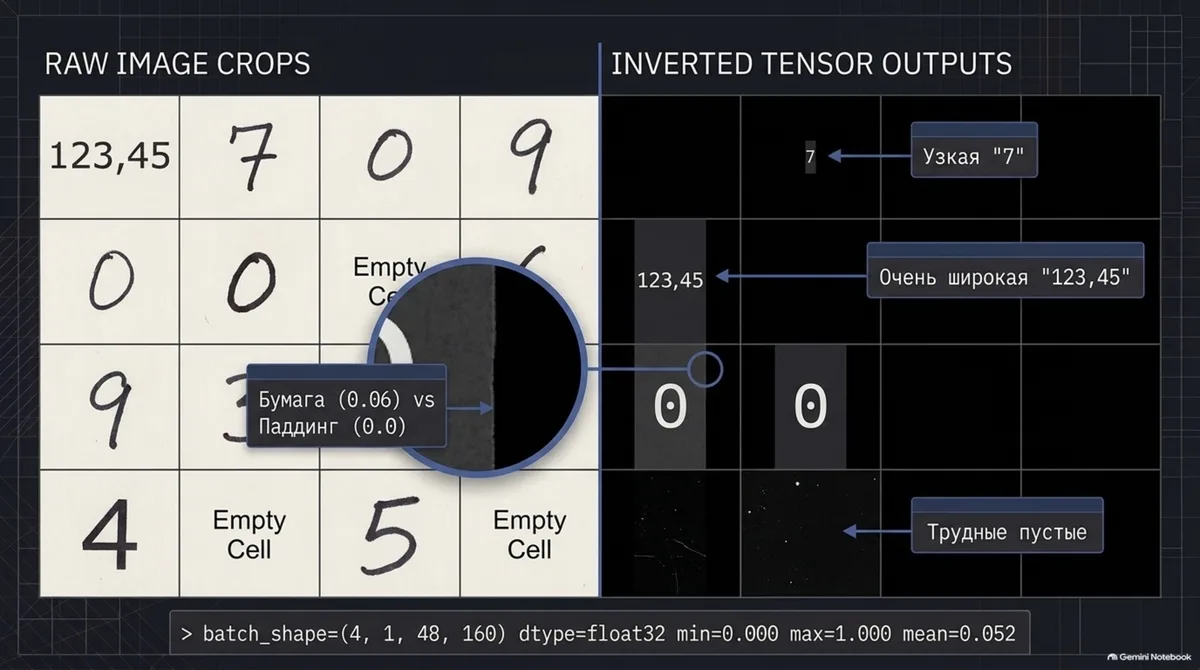
What to notice:
- Narrow
7is flush left; the rest of the canvas is black padding. The model will see such crops often. - Very wide string
123,45became small after fitting. That is the price of letterbox: wide strings lose resolution. Canvas 48×160 suits typical values, not everything. - Paper and padding differ. Crop background in the tensor is dark gray (about 0.06), padding is exactly 0. You see it at the right edge: paper is slightly lighter than empty space. Why is paper not zero? In the source the background is not perfect 255: the generator puts noise roughly in 225–255. After divide by 255 and inversion you get a small tail near 0.06. Padding we filled with exactly 255 → after inversion exactly 0. On the grid that edge is not a bug but two different sources of "white."
- Two empty cells are not the same. One is smooth; the other has a line and spots. The detector will learn such "hard empty" cells. Column "canvas" on the grid is still before inversion: paper light, padding white. Column "tensor" is after: stroke bright, emptiness dark — how the model sees the input.
Compare with your predictions. Especially the third question: if you expected an empty cell to stay empty, you now see why autocontrast_safe is needed. Without it on the same empty you get max ≈ 0.98 and mean ≈ 0.40 — paper noise looks like text.
Exercise
- Feed a very wide and a very narrow string (the folder already has
123_45and7) and see what letterbox does. Then change the canvas to 32×128 (constantsCANVAS_H,CANVAS_W) and compare grids. What happened to the wide string? - In
preprocess_arrayreplaceautocontrast_safewithImageOps.autocontrastand rebuild the grid. How did empty cells change? Which test failed? - Set
MIN_CONTRAST_RANGE = 80and look at the dullest crops. What happens to a crop with pale ink?
If it fails
FileNotFoundErroror "no PNG in folder". Runpython src/make_demo_crops.py --out data/synthetic/rawfirst, then the other commands. All commands run from the repository root.ModuleNotFoundError: image_to_tensorin tests. Run tests from the root:python -m pytest tests/test_image_to_tensor.py -q.- Text on demo crops is very small. In Pillow older than 10.1 you cannot set the built-in font size and the script falls back to tiny. Update Pillow:
pip install -U "Pillow>=10.1". ModuleNotFoundError: matplotlib. Lesson 1 environment is not active or dependencies missing:pip install -r requirements.txt.- Test
test_tensor_wrapperskipped.torchis not installed. Fine for the NumPy core, but return to lesson 1. - Your own image is all black. Our contract expects dark ink on light paper. If you have light text on dark background, invert the source first.
Readiness checklist
- Lesson files in your repository, demo crops generated, changes committed
- CLI prints
shape=(1, 48, 160) dtype=float32 - Grid saved and reviewed against the four observations
-
python -m pytest tests/test_image_to_tensor.py -q→8 passed - Three forecasts from "Predict" compared
Not yet
- Alphabet and labels (lesson 3) and Dataset with augmentations (lessons 4–6). Today is only image → numbers of one shape.
- Cost of threshold
MIN_CONTRAST_RANGE. The guard also fires on very pale but real text: if brightness span is below 30 levels, contrast is not stretched and pale ink stays dull. For our synthetic data that is fine. On real scans the threshold must be tuned — we cover that in the appendix on real data. - Grid script as "core".
experiments/show_preprocess_grid.pyis a convenient picture for the eyes. Contract logic lives only inimage_to_tensor.py. - EXIF orientation. Phone photos may record rotation; synthetic PNGs do not need it.
FAQ
Why canvas 48×160 and not a square?
Form cell crops are usually wider than tall: digits run in a line. A square either clips text or leaves too much empty space on the sides. 48×160 is a compromise for typical course values; very wide strings still shrink — visible on the grid.
Why inversion if paper could stay white?
After letterbox padding is white (255). Inversion makes it exactly 0 and stroke near 1. Then "empty canvas" and "background without ink" agree: the model does not confuse padding with white paper as a strong signal.
Can we stretch the crop to 48×160 without letterbox?
You can, but proportions break: wide 123,45 gets squashed. Letterbox keeps digit shape at the cost of resolution on very wide strings. For OCR that is usually the lesser evil than distorted type.
Why tests on NumPy and not straight on torch.Tensor?
The preprocessing core does not depend on PyTorch: easier to debug and run in CI. Wrapper image_to_tensor is thin; the wrapper test skips only if torch is missing.
What if we remove autocontrast_safe?
An empty cell with paper noise becomes "text": max about 0.98. The empty/filled detector later gets a false signal. Test test_empty_crop_noise_is_not_amplified catches that break.
Should we commit data/synthetic/raw?
No. Crops are recreated with --seed 42. The folder is in .gitignore; for the article and lesson the generate command is enough.
What comes next
Next lesson — Lesson 3. Alphabet, labels, format. Dataset with augmentations — lessons 4–6.
Reference for comparison: lesson-02. Do not clone it. Previous: Lesson 1. The lab.
Comments