
Contents
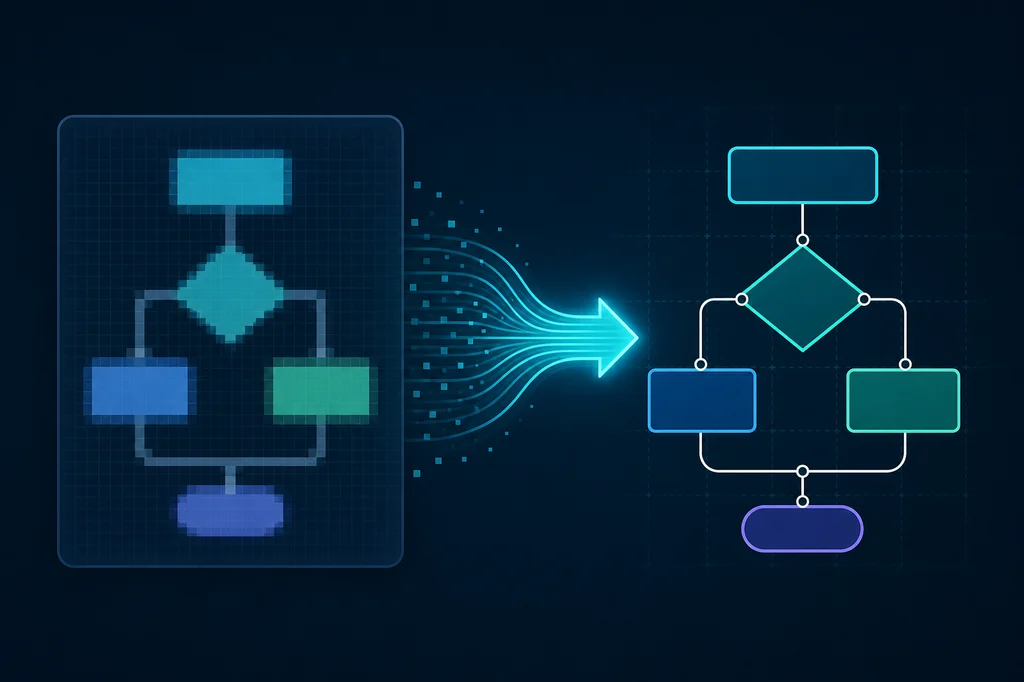
A slide screenshot, a whiteboard photo after a meeting, a PDF with a network sketch — all of these are images. An editable diagram is a model: nodes, edges, shape types, labels, sometimes layers and notation rules. Bridging the two is not “run OCR” or “trace contours.” This guide covers diagram types, classic pipelines (OCR, vectorization, CAD), computer-vision approaches, and what changed with multimodal models in 2025–2026 — through Mermaid, PlantUML, and draw.io XML generation.
Key takeaways
Images and diagrams live at different abstraction levels. Pixels or vector paths do not encode “this is a BPMN gateway” or “this VLAN sits on L3.” Without graph reconstruction you get a pretty SVG, not an editable draw.io diagram.
OCR only solves labels. Tesseract, Google Vision, and peers extract text with coordinates but do not know that an arrow from A to B means “Yes.” Use OCR for captions; not for structure alone.
Vectorization and CAD target drawings more than flowcharts. Vector Magic and Scan2CAD produce lines and arcs in DWG/DXF or SVG paths. That helps floor plans and mechanical parts, not BPMN swimlanes or UML classes without heavy manual cleanup.
AI in 2025–2026 is the first practical layer for “simple” diagrams. Vision-language models (Gemini, Claude, GPT-4o) and systems like Flowchart2Mermaid turn flowchart photos into Mermaid text with acceptable quality on easy cases. Dense notation, tight layout, and handwriting still need a human in the loop.
The practical chain is hybrid. Preprocess the image → classify diagram type → route (CAD / CV / VLM) → emit target format → validate and edit. Fully unattended conversion is realistic only for a narrow class: clean flowcharts with horizontal layout and readable fonts.
Diagram types and why the pipeline depends on them
Not every “picture with arrows” is the same. Notation defines expected primitives, connection rules, and what counts as a conversion error.
Flowcharts use process rectangles, decision diamonds, and labeled yes/no edges. They are the most common raster-to-editable request. Targets include Mermaid flowchart, draw.io, and Visio. VLMs plus “shape detection + OCR” work best here.
UML spans class, sequence, state, component diagrams, and more. Each has its own elements (lifelines, activations, association cardinality). A class-diagram slide needs relationship semantics — inheritance vs aggregation — not just text. PlantUML and Mermaid cover subsets; full round-trips to EA or Sparx usually rely on native imports, not OCR.
BPMN 2.0 standardizes business processes: tasks, gateways, pools, swimlanes, events. It looks like a flowchart but semantics are stricter — you cannot infer an XOR gateway from a diamond shape alone. Raster-to-BPMN XML tools are rare; teams redraw in Camunda Modeler or treat AI output as a draft for analyst review.
Network and architecture diagrams use vendor icons, security zones, IP and VLAN labels. OCR extracts addresses; recognizing “this is an ALB, not a rectangle” needs icon detection or a VLM prompted for cloud topology. draw.io stencils are rich; generating XML with correct styles is its own problem.
CAD drawings and plans are geometry with dimensions and hatching, not process graphs. Scan2CAD, AutoCAD Raster Design, and contour vectorization target DWG/DXF — not Mermaid.
Other types — mind maps, org charts, ER diagrams, DFDs, Gantt charts — each needs a different angle. There is no universal “recognize everything” engine; a classifier at the pipeline input saves hours of wrong routes.
Why an image and a diagram are different entities
A PNG is a pixel grid (or compressed representation). Even “vector” PDFs often store text as curves without document structure. An editable diagram in draw.io, Mermaid, or Visio stores objects: node id, shape type, coordinates, text, outgoing edges, styles.
Semantics are lost when someone exports “for the slide.” Grouped shapes, rasterized shadows, merged layers — recovery requires reconstruction. Three editability levels matter:
At level zero you crop the bitmap. At level one you get SVG paths — fill and scale change, but you cannot drag an arrow to another block as in a diagram editor. At level two you have a graph: nodes and edges in a model. At level three you have notation: BPMN task types, UML stereotypes, metamodel bindings.
OCR operates on text in bounding boxes. Vectorization sits between zero and one. CAD tools pull toward one–two for linear geometry. Full level two–three from arbitrary raster is CV and AI territory plus human verification.
Another common case: a screenshot from a web editor where the source was JSON or XML, but the user only sees bitmap. The best fix is the source file (.drawio, Mermaid in Git), not pixel recognition. Image conversion is the fallback when the source is gone.
The OCR approach: text without structure
Optical character recognition extracts strings and positions. On diagrams that yields labels inside boxes and on arrows — useful as a second pass after shape detection, insufficient alone.
Classic stack: Tesseract, Google Cloud Vision / Document AI, ABBYY FineReader, PaddleOCR, EasyOCR in Python pipelines. For slides and scans with non-Latin text, language packs and preprocessing matter: deskew, binarization, higher DPI. Poor contrast and JPEG artifacts hurt accuracy before model choice.
A typical OCR pipeline: find text regions, filter noise, match each string to the nearest rectangle by IoU or center distance. OCR does not see edges between blocks — lines and arrows are a separate object class.
In production OCR pairs well with document cataloging — e.g. Google Apps Script plus Drive OCR for PDF archives (smart document registry with Drive OCR). For diagrams, combine OCR with shape detection or a VLM.
Limits: tiny slide fonts, rotated text, icons without text, handwriting, bilingual labels. After OCR you still need graph assembly — otherwise you get a spreadsheet of phrases, not draw.io.
Vectorization: from raster to contours, not semantics
Vectorization turns raster into Bézier curves and polygons: Potrace, Adobe Illustrator Image Trace, Inkscape Trace Bitmap, commercial Vector Magic. Output is SVG or EPS with fills and strokes.
For illustrations that is enough. For a flowchart each “rectangle” may become dozens of paths; an arrow is a triangle plus line without logical from→to. Illustrator editing is visual; Mermaid or PlantUML transfer stays manual.
Useful tricks: trace with limited colors, simplify curves, cluster nearby contours into rectangles (Python + Shapely). That is semi-automated between levels one and two. Flat-color slides often trace cleaner in Vector Magic than with free Potrace.
Vectorization does not replace source discipline. If the team only keeps PNG, adopt “diagram = file in Git” instead of escalating tracing.
The CAD approach: Scan2CAD, Raster Design, and engineering drawings
When the subject is a floor plan, mechanical part, or survey, not process notation, CAD tools apply. Scan2CAD converts raster to DWG/DXF: lines, arcs, sometimes hatching. AutoCAD Raster Design vectorizes underlays for drafting on top.
These systems favor orthogonal geometry and scale. Flowcharts with arbitrary spacing are a weak fit. For dimensioned paper scans CAD beats feeding a VLM a “flowchart” prompt.
Pipeline: scan → denoise → scale reference → vectorize → manual layer cleanup in AutoCAD or LibreCAD. Room/door semantics appear only with BIM objects on top, not from one JPEG.
Software teams hit CAD less often than BPMN/UML, but hybrid hardware/software orgs and data-center docs still see it.
Computer vision: detecting shapes, lines, and links
Before mass VLM adoption, engineers built classical CV pipelines: binarize, find contours (OpenCV), filter rectangles and diamonds, detect lines with Hough transforms, infer arrowheads as triangles. Text came from OCR in ROIs.
Research datasets cover charts and diagrams: ChartQA, PDF layout (PubLayNet, flowchart sets). Detectors (YOLO, Faster R-CNN) train on classes like process, decision, connector. Synthetic Visio exports recognize better than projector photos.
Hard cases: line crossings, rounded corners, group frames, nonstandard fonts, semi-transparent Figma exports. Text-to-shape association breaks in tight layouts. CV pipelines often emit intermediate JSON and a UI for manual merge — like legacy Visio import tools.
CV + OCR + heuristics still wins when data is uniform (one generator) and you need on-prem without cloud LLM. For one-off arbitrary images, VLM is often cheaper to build.
VLM research for chart QA (e.g. Chartographer) shows models understand images for questions but generating exact code is a separate, brittle task (VLM chart QA overview).
AI approaches 2025–2026: VLMs, specialized systems, and draw.io
The main shift since 2024–2025 is vision-language models: one model takes an image and instruction “return Mermaid flowchart” or “list nodes and edges as JSON.” GPT-4o, Gemini 1.5/2.x, Claude with vision, open Qwen-VL, LLaVA — choose by price, latency, and data policy.
Flowchart2Mermaid (arxiv 2512.02170, web app flowchart-to-mermaid) exemplifies 2025: a VLM emits Mermaid, then humans refine via inline edit, drag-and-drop symbols, and natural-language patches (“connect A to B labeled Yes”). Honest human-in-the-loop — accuracy on complex sheets drops without it.
draw.io in 2026 ships an upgraded Generate tool (sparkle icon): text generation plus multiple backends (Gemini, Claude, ChatGPT), including Mermaid-like diagrams. Confluence Cloud disables AI by default — admins must enable it. draw.io does not store diagram data on its servers, but prompts go to model providers — relevant for NDAs.
Open-source smart-drawio-next combines reference image upload, streaming XML generation, and embedded draw.io — a workable image→XML→edit prototype.
VLM strengths: fast start, portability across simple diagram types, natural language for edits. Weaknesses: hallucinated nodes, missed branches, confused similar shapes, ignored color legends, weak swimlanes and custom icons. Whiteboard glare crushes quality.
For enterprise: redact sensitive diagrams, pick API region, log prompts, require engineer or analyst review. AI accelerates drafts; it does not notarize them.
Generating Mermaid, PlantUML, and draw.io XML
Text diagram formats fit Git, CI rendering, and keyboard editing.
Mermaid (flowchart, sequenceDiagram, classDiagram, C4Context, etc.) is the de facto Markdown-repo standard. Compact syntax; parser errors show in Mermaid Live Editor. VLMs target Mermaid well because training data includes code examples.
PlantUML is richer for UML and some architecture notations; longer text, finer class and sequence control. Raster→PlantUML is rarer than Mermaid; teams often generate PlantUML from specs, not photos.
draw.io XML (mxGraphModel) is the diagrams.net format: positions, styles, edges, icon libraries. AI tools (AIDrawIO, smart-drawio-next) aim for XML so users drag blocks in the editor. Post-processing (alignment, edge routing) often needs scripts.
Typical chain: image → VLM → Mermaid → SVG render → draw.io import, or direct image → XML. draw.io imports Mermaid and splits into shapes.
Validate with parsers; count nodes vs visual check; compare OCR labels to code text. “Code compiles” tests catch gross garbage, not wrong branching logic.
What works in practice
From team experience and benchmarks like Flowchart2Mermaid, realistic expectations look like this.
Automates well: clean flowchart screenshots from Visio/draw.io/Slides; horizontal or vertical layout; fonts ≥10 pt; high-contrast black-and-white shapes; ~15–20 nodes; shallow branching.
Automates poorly: angled whiteboard photos; gradients and shadows; BPMN with pools; network diagrams full of vendor icons; book scans; diagrams where meaning lives in color or line style, not geometry alone.
OCR alone when you already have vector PDF with a text layer — extract and assemble manually, faster than VLM. Vectorization for posters, not logic. CAD for plans. VLM for documentation drafts and “rescue this old PPT” tickets.
Process beats model spend: store .drawio beside .png in Git, export Mermaid from source of truth, ban “Confluence image only.” Raster conversion is insurance, not the norm.
Related work on PDF layout and tables rhymes with diagrams: without layout analysis, OCR noise dominates (OpenDataLoader PDF).
The ideal automated conversion chain
Below is a reference pipeline from off-the-shelf services and scripts. Each step is logged; output is reviewable.
Step 1. Intake and preprocess. Upload PNG/JPEG/PDF, convert to RGB, deskew, sharpen, optional background removal for boards. Normalize DPI to 150–300 for OCR and VLM.
Step 2. Type classification. Lightweight classifier or fast VLM call: flowchart / UML / network / CAD / unknown. Route accordingly.
Step 3. Structure extraction. For flowcharts — VLM with strict JSON schema or direct Mermaid; parallel OCR for label cross-check. For networks — icon detection + OCR for IPs/names. For CAD — Scan2CAD or equivalent.
Step 4. Normalize and validate. Parse Mermaid/PlantUML/XML; fix syntax; check graph connectivity; compare OCR labels to code.
Step 5. Layout post-process. Auto-layout (Graphviz, dagre, draw.io), grid alignment, id renaming.
Step 6. Human-in-the-loop. Side-by-side source vs result UI; edit node/edge; re-prompt on subgraph. Log fixes for few-shot later.
Step 7. Export. Mermaid to Git, XML to draw.io, PNG/SVG for slides. Metadata: model version, date, reviewer.
Small teams can shrink this to “upload to Flowchart2Mermaid → fix → export to Git.” Enterprises can run on-prem Qwen-VL for closed diagrams.
FAQ
Can I use only Tesseract?
Not for a full diagram. Tesseract gives text and boxes. Relationships need other methods. OCR fits as a label cross-check after VLM or CV.
How is Vector Magic different from an AI converter?
Vector Magic and Image Trace build contours without BPMN gateway semantics. AI converters try to rebuild a graph as Mermaid or XML. Prefer AI for logical diagrams; vectorization for illustrations.
Does draw.io import images semantically?
Raster import places a bitmap on the canvas — not semantic conversion. Use Generate / external VLM tools and import XML or Mermaid.
How accurate is Flowchart2Mermaid on real diagrams?
High draft value on simple canonical flowcharts. Whiteboard photos and dense slides often miss branches and labels; the system assumes manual edit. Benchmark on your own 10–20 samples.
PlantUML or Mermaid for UML recovery?
Mermaid is easier for VLMs and Markdown repos. PlantUML is finer for classic UML if the model targets that output. Many teams generate Mermaid classDiagram then hand-fix.
Is it safe to send an architecture diagram to ChatGPT?
Prompts and images go to the provider. For NDA diagrams use on-prem VLM, redact hostnames, or redraw. draw.io does not store your file, but API traffic still occurs.
Do I need a GPU for my own pipeline?
No for cloud APIs. Yes for local Qwen-VL or high-volume CV. OpenCV + Tesseract runs on CPU.
What if the original .drawio still exists?
Do not recognize pixels. Open the source — that is 100% editability. Image conversion is for lost files only.
How do I measure conversion quality?
Count nodes and edges on original vs code; OCR all labels; walk every branch; have a second person trace the scenario on the recovered diagram.
Is fine-tuning worth it?
Yes if you have hundreds of one corporate template. For ad hoc work, few-shot prompts and human review are cheaper.
Further reading
Related posts: OCR and AI for Drive document cataloging, VLMs and chart QA (Chartographer), PDF layout and tables, evolution of web architecture, agile terminology guide, SEO/AEO/GEO for technical content.
Conclusion
Turning a diagram image into an editable diagram in 2026 is realistic for a narrow task class — mainly simple flowcharts via VLM and Mermaid/draw.io XML. OCR, vectorization, and CAD stay specialized for text, contours, and mechanical drawings, not notation understanding. Build the process: diagram type → right route → validation → human review — and keep diagram sources in version control so you do not re-convert raster repeatedly. This week, run one typical schema from your docs through Flowchart2Mermaid or draw.io Generate and record what percentage of nodes you fixed by hand — that is your honest automation baseline.
Comments