


Contents
A two-billion-row table in an ERP is not slow "because it's big." It is slow when a query reads more than it needs, an index doesn't match the filter, statistics lie, a transaction holds a lock, or a report recomputes the whole history every time. Below is the full practical loop: from a 15–30 minute measurement to schema, partitions, caching, and distributed architecture. The material is not tied to a single DBMS. Examples rely on PostgreSQL, Microsoft SQL Server, and MySQL/InnoDB, with a separate focus on EAV and enterprise systems.
Key takeaways
Volume alone does not mean slowness. A billion rows with a narrow index and partition pruning can answer faster than ten million rows with no selectivity and a SELECT *.
Diagnosis comes before the recipe. The execution plan, logical reads, p95, and lock waits tell you more than a feeling that "the database is heavy."
An index is not a free accelerator. It speeds up reads along the paths you chose and slows down every write. An extra index on a hot table is often worse than a missing one.
EAV and wide ERP tables break because of the model, not because of "SQL Server / Postgres." Many attributes reached through joins and a single value column hit both the optimizer and the indexes. A detailed breakdown of the pattern is in a separate article on EAV.
Partitioning is a maintenance and data-pruning tool, not a magic button. Without pruning and without an archive policy it only adds complexity.
Scaling out after local mess multiplies the mess. A replica or a shard makes sense when the bottleneck has already been named and exhausted locally.
Why huge databases start to slow down
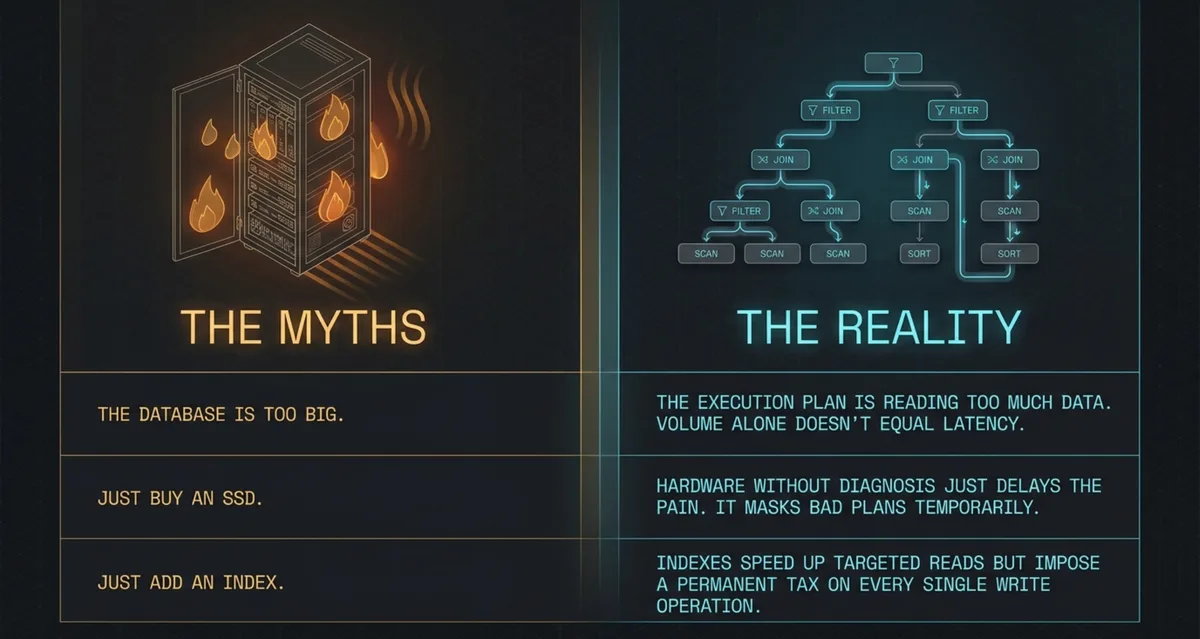
"Big database" usually means different things in a team conversation. For some it is tens of millions of rows in an order table. For others it is hundreds of gigabytes of indexes. For others it is a single movements table with two billion records in an ERP system. It is more practical to think in behavior thresholds than in labels. While the hot working set fits in the buffer pool and filters are selective, the volume on disk is barely noticeable. The pain starts when the plan reads wide ranges, the cardinality estimate is off by orders of magnitude, or contention for hot pages turns a fast single query into a queue.
The typical scenario is familiar from implementation sites. The accounting system runs for years, the table of documents or attribute values grows with no archive, period reports scan the history, and the "temporary" practice of adding an index for every new filter is something nobody revisits. Adding CPU and SSDs shortens the disk queue for a while and masks the same bad plan. A quarter later the load catches up with the hardware. For related context on the monolith and accumulated complexity, see why ERP systems become monoliths and a fifteen-year legacy project.
Optimization myths persist because they sometimes work. "Let's add an index" helps if the filter is selective and the column order matches. "Let's buy SSDs" helps with pure random page reads. "Let's rewrite the query" helps when extra joins and implicit conversions are really in the plan. The mistake is taking any of these steps without measuring: which resource the thread is waiting on, how many pages are read, whether the row estimate matches reality.
Diagnostics: measure first, optimize second
What to measure
Pin down the problem scenario so that it can be repeated: a specific query or API call, the size of the input parameters, the time of day. Don't look only at the average. Users care about the tails: p50, p95, p99. Alongside them, track throughput (queries or transactions per second), the number of logical and physical page reads, CPU, memory pressure, disk queue length, lock waits, and deadlocks. Separately record the size of the table, the indexes, the transaction log (WAL / transaction log), and the volume of temporary files used by sorts and hash joins.
Tools by engine
In PostgreSQL the basic loop is EXPLAIN (ANALYZE, BUFFERS) on a reproducible query and pg_stat_statements for the top by total time. In SQL Server it is the Actual Execution Plan, Query Store for plan regressions, DMVs for waits, and Extended Events when needed. In MySQL 8 it is EXPLAIN ANALYZE, Performance Schema, and the slow query log with a sensible threshold. At the application level, traces with SQL duration and a round-trip counter are useful. Without them, N+1 looks like a "slow database" even though the database answers in milliseconds.
How to read a plan
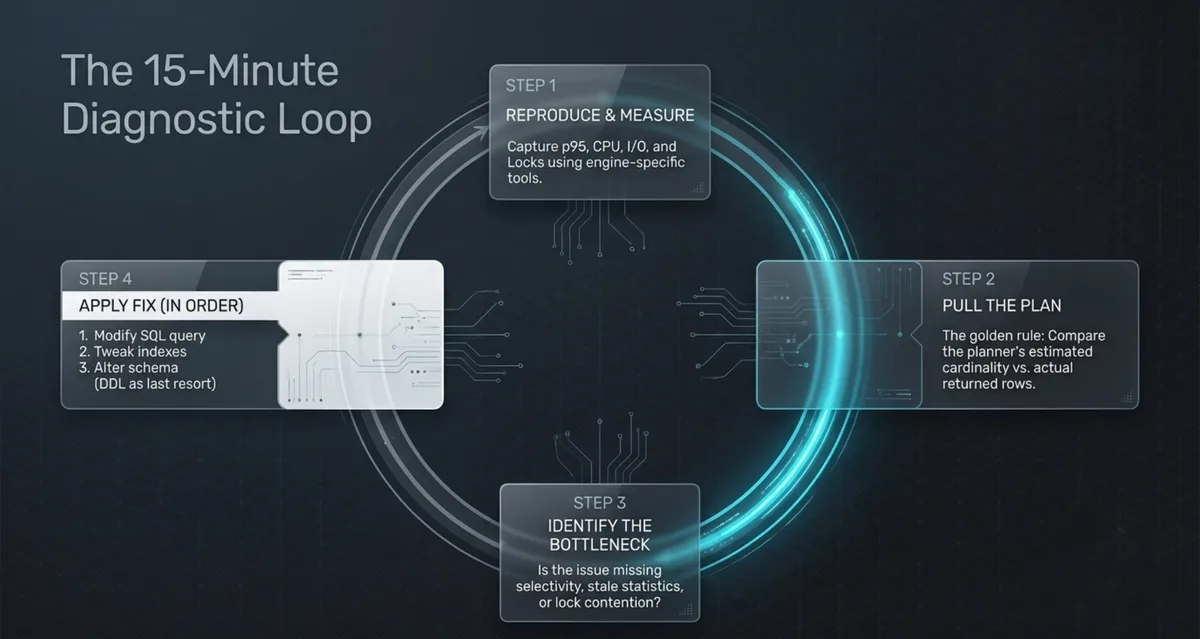
Look for a full scan where you expected a narrow index, a Nested Loop on large sides of a join, a Hash Join or Merge Join with an unexpected sort, and spills to temporary files or TempDB. The main signal is an estimated vs. actual rows gap of orders of magnitude: stale statistics, column correlations, or a parameter for which the plan was "sniffed" once. The 15–30 minute algorithm: reproduce, capture the plan with actuals, name the dominant wait (CPU / I/O / lock), check filter selectivity and statistics freshness, and only then change the index or the SQL text.
The quick decision tree looks like this. Many logical reads and a wide range: index, covering, early filter. The row estimate is off: statistics and parameters. The query is fast alone but not under load: locks and hot pages. A heavy report over history: aggregates, materialization, offloading to an analytical store, not one more B-tree on the OLTP database.
A practical quarter-hour pass: (1) reproduce on a copy or in a quiet window with the same parameters; (2) capture the plan with actuals (ANALYZE / Actual Plan); (3) write down the top wait over the problem interval; (4) compare estimated and actual on the most expensive nodes; (5) decide whether it is selectivity, statistics, locking, or result size. Open the DDL only after the fifth step.
Optimizing SQL queries
Start with the shape of the result. SELECT * on a wide table pulls extra pages and gets in the way of a covering index. Filter as early as possible: in WHERE and in subqueries that cut entities before the joins. Correlated subqueries often turn into a Nested Loop over millions of rows. Compare them with JOIN, EXISTS, or a semi-join on the real plan, not by taste. IN with a list of constants and IN with a subquery are different beasts for the optimizer.
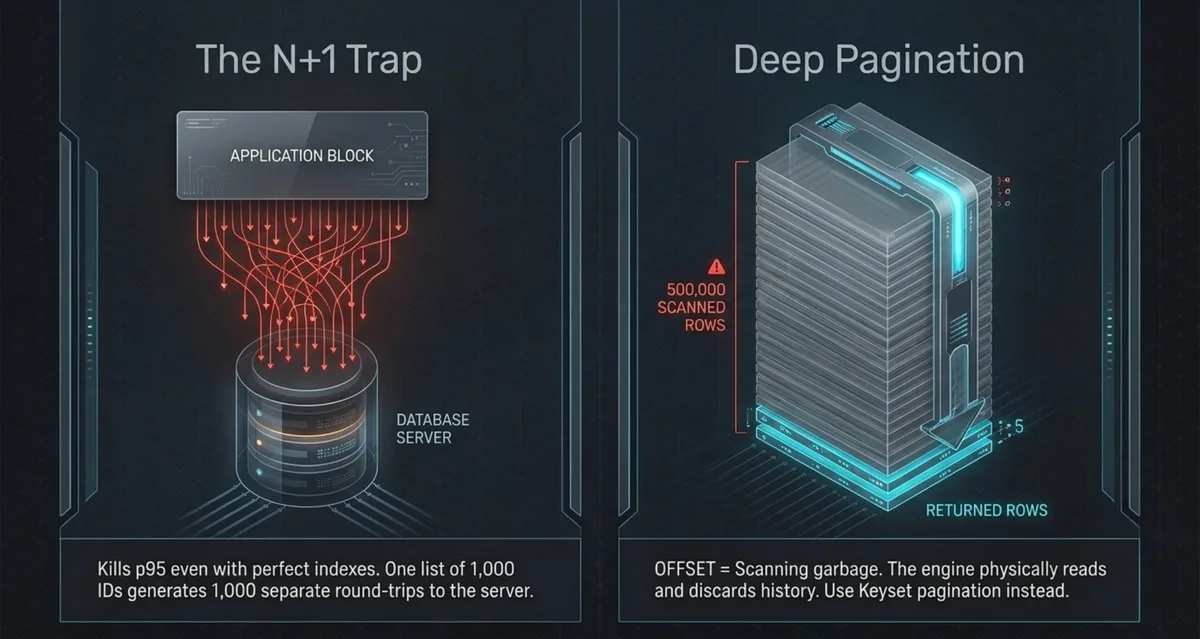
N+1 in an ORM on large collections kills p95 even with perfect indexes: one list of a thousand ids spawns a thousand round trips. Aggregations and sorts are expensive if the sorted set doesn't fit in memory, so watch for spills. CTEs behave differently across engines: in some it is an optimization hint, in others a materialization. A temporary table with an index is sometimes cheaper than a "pretty" CTE over a huge intermediate result. Implicit conversions (WHERE indexed_col = @nvarchar with an int column) silently disable the index. In SQL Server, check parameter sniffing separately: a plan that is good for a rare parameter ruins the frequent one. Pagination through a large OFFSET makes the engine walk through and discard millions of rows, while keyset / seek on the last key scales differently. Functions on an indexed column (WHERE YEAR(date) = 2024) usually rule out a seek. Move the computation to a constant, or use an expression index if the engine allows it. Mass "fix everything in one transaction" operations break the log and the locks, whereas batches of a controlled size are predictable.
A bad draft and the direction of improvement:
-- before: function on column, SELECT *, status filter after a wide read
SELECT *
FROM movements m
JOIN entities e ON e.id = m.entity_id
WHERE YEAR(m.created_at) = 2024
  AND e.status = 'active';

-- after: date range, narrow projection; status via a selective path
SELECT m.id, m.entity_id, m.amount, m.created_at
FROM movements m
JOIN entities e ON e.id = m.entity_id
WHERE m.created_at >= TIMESTAMP '2024-01-01'
  AND m.created_at <  TIMESTAMP '2025-01-01'
  AND e.status = 'active';
Paging "deep" into a list:
-- expensive on large tables: the engine reads and discards offset rows
SELECT id, title FROM tickets
ORDER BY id
OFFSET 500000 LIMIT 50;

-- keyset: continue after the last key of the previous page
SELECT id, title FROM tickets
WHERE id > :last_id
ORDER BY id
LIMIT 50;
EXISTS often beats an aggregating DISTINCT on large sides when you only need an existence check. Compare plans at production-like volume: a thousand-row test bench lies about both the join choice and memory. The economics of the data structures behind these choices is covered in the article on data structures as investments. A short breakdown of six tactics is in the adaptation on database optimization strategies.
Indexes: from the basics to cases where they don't help
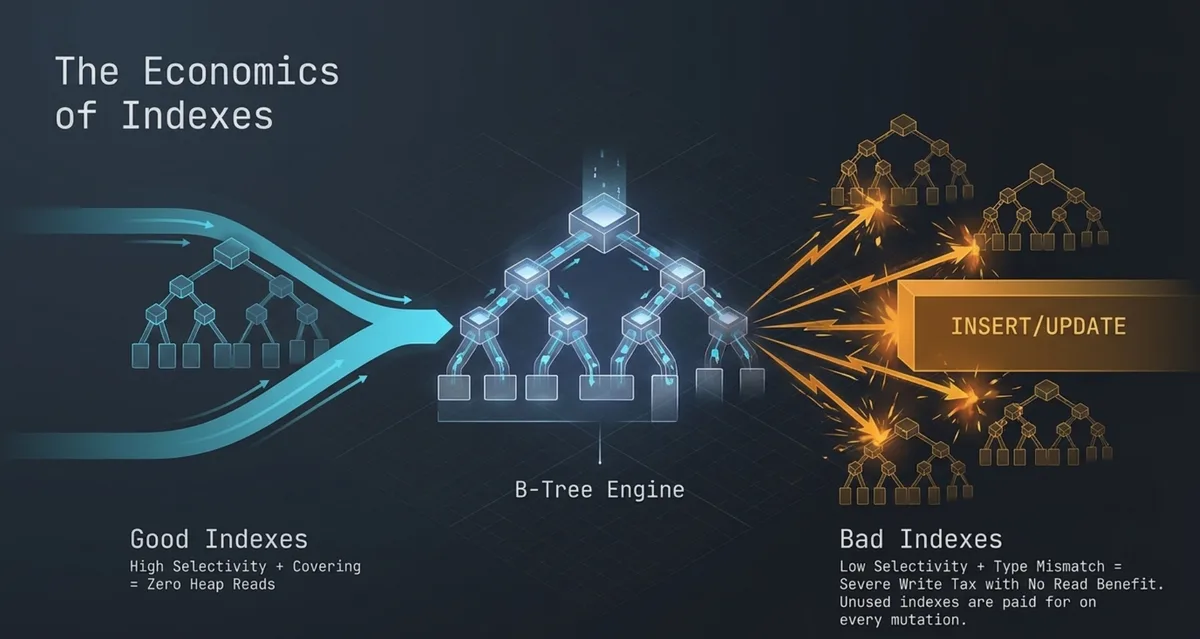
B-tree remains the workhorse of OLTP. The clustered / primary index defines row order in SQL Server and InnoDB (clustered by primary key). In PostgreSQL the heap plus secondary indexes work differently, so don't carry habits over one to one. A composite index works left to right: (status, created_at) helps a filter on status plus a date range, but barely helps created_at alone. A covering index (INCLUDE in SQL Server / PostgreSQL) removes the lookup if all the needed columns are already in the index. Partial and filtered indexes pay off when the hot slice is small ("only open," "only active"). Expression indexes and computed columns save you from functions in WHERE. JSON and full-text search need their own mechanisms, not "one more B-tree over the whole text." In PostgreSQL, on huge time-ordered tables, BRIN gives cheap metadata about block ranges, provided there is physical correlation. In SQL Server, columnstore fits analytical scans, not as a replacement for a narrow OLTP seek.
Selectivity and fresh statistics decide whether the optimizer will take an index. Redundant and unused indexes are still paid for on INSERT/UPDATE/DELETE. Fragmentation and rebuilds are a maintenance topic, not the first button to press for a slow SELECT. Look at the plan first.
An index "doesn't help" when selectivity is low (a status with two values split across half the table), the column order doesn't match the query, statistics are stale, a type is compared through a conversion, the query returns too large a share of the table, or the optimizer chose a different plan because of parameters. In that case, "add an index" without analysis is a lottery with a write tax.
Data schema and the special case of EAV in ERP

Normalization removes update anomalies. Controlled denormalization buys cheap reads at the cost of consistency on write. Narrow types and giving up "just in case nvarchar(max)" reduce row size and improve page density. Surrogate keys are convenient for joins. Natural keys are sometimes better for meaningful partitioning, if they are stable. Foreign keys on billions of rows cost checks on write, so be aware of the price. A wide "card with a hundred columns" hits the buffer pool, and vertical splitting of cold attributes shrinks the hot row. A history archive and materialized aggregates are often cheaper than endlessly adding indexes on OLTP.
EAV (entity–attribute–value) swells to billions of rows because every field of a card is a separate record. A filter like "color = X and weight > Y" turns into several joins or groupings over a single values table. An index like (entity_id, attribute_id, value) helps point reads of an attribute but poorly covers analytics over many attributes at once. Typed value tables (numbers, strings, dates separately) improve comparison and statistics. Frequently used attributes are moved into ordinary columns or into a narrow "hot fields" table. Card caching, precomputed aggregates, and gradual migration without a big bang are workable paths. A one-shot rebuild of an ERP core usually costs more than a year of degradation. For the mechanics and the limits of applicability, see the EAV breakdown. For the platform framing, see modern ERP design.
Partitioning and tables with billions of rows
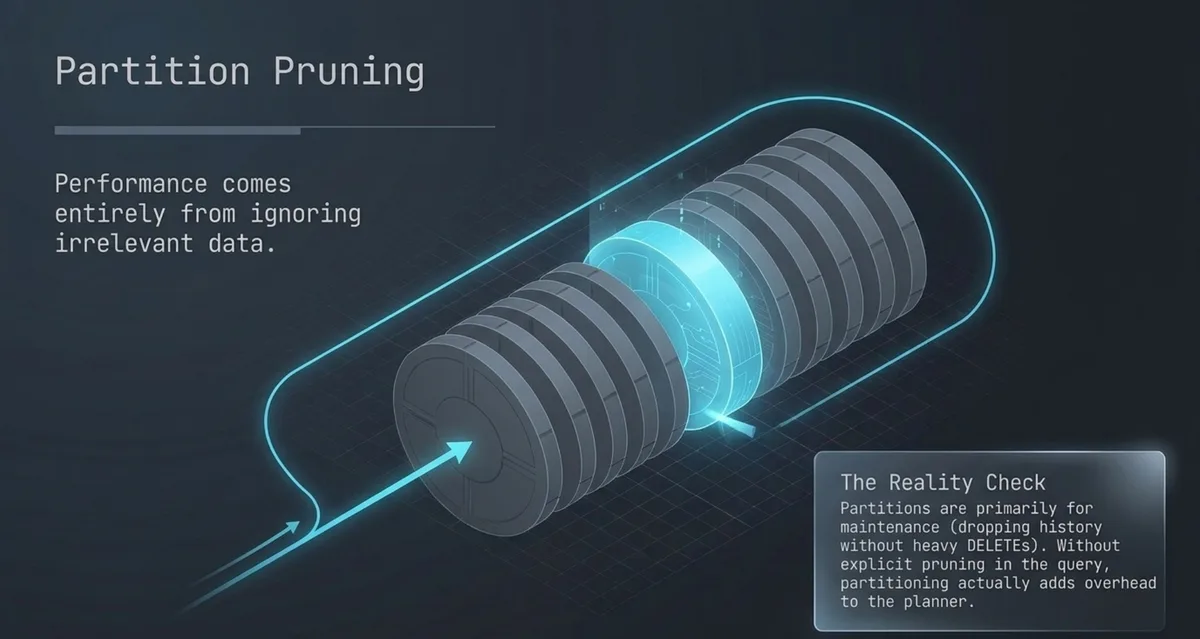
Horizontal splitting cuts rows (often by time or key range), and vertical splitting cuts columns. Lists and hash are used when a time range doesn't fit. Partition pruning works when the predicate explicitly bounds the partition key. A function on the key, or a parameter "invisible" to pruning, reads everything again. Local and global indexes work differently in SQL Server, PostgreSQL, and MySQL, so check the engine's documentation, not a generic slide. Aging partitions are detached and archived without a heavy row-by-row DELETE. Partitioning speeds up maintenance and some range queries. It doesn't cure poor selectivity inside a partition, and it adds overhead for the planner. Rebuilding a monolith into partitions is done with expand–contract: the new structure alongside the old, backfill in batches, dual write or CDC, switch reads, then writes.
Bulk operations, the log, and maintenance
Bulk INSERT and fixed-size batches are more predictable than a single INSERT of a million rows in one transaction. The same goes for UPDATE/DELETE: short transactions, and control over log growth and locks. In PostgreSQL, watch autovacuum and bloat on hot tables. "Vacuum can't keep up" shows as bloated tables and stale visibility maps. In SQL Server, maintain statistics and rebuild indexes sensibly based on actual fragmentation and load, not on a calendar for the sake of a checkmark. In MySQL, keep statistics current and pick OPTIMIZE / online DDL strategies by version. Retention: delete or detach outdated data according to product policy. Online DDL reduces downtime but still loads I/O and replication, so plan the window and the rollback.
Transactions, locks, and concurrency
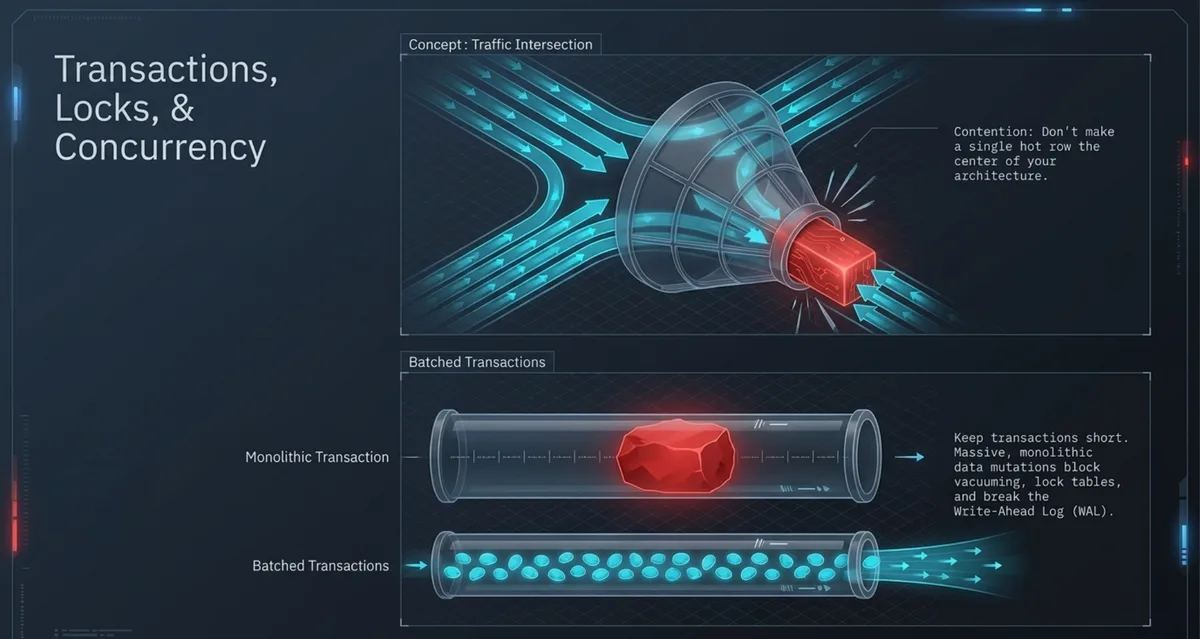
Isolation levels and MVCC pay for consistency in different ways: some block readers, others bloat row versions. A long transaction holds locks and interferes with vacuum / cleanup. Deadlocks are often cured by a stable order of resource acquisition, not by "retry at random" with no limit. Optimistic concurrency works well when conflicts are rare, and pessimistic when collisions are constant. A hot counter row, or "one queue in a table," runs into the page. Sometimes batched number allocation helps, or a queue outside the row. Separating reads from writes (replica, CQRS) reduces conflict if the business tolerates read lag. If a query is fast alone but not under load, look at waits and locks, not just the plan's CPU.
Memory, disks, and server configuration
The buffer pool / shared_buffers should cover the hot working set. Otherwise you are tuning SQL while suffering from physical reads. NVMe takes a lot of random I/O off the table but doesn't fix a full scan of history every time. TempDB and temporary files mirror heavy sorts and hashes. Query parallelism speeds up some queries and chokes others when CPU is overloaded. A connection pool with no ceiling turns the database into a queue, while a pool that is too narrow turns into application failures. Checkpoint, WAL, and logs are tuned for the write profile, not "as in a blog about another DBMS." NUMA matters on large multi-socket machines when memory and processors are "not close." The rule: don't copy setting values between PostgreSQL, SQL Server, and MySQL, and don't raise memory limits blindly, because that can increase pressure and cause a regression.
Telling a resource shortage from bad SQL is simple once you measure. High CPU with few logical reads hints at computation and bad plans. Huge reads with idle CPU point to I/O and selectivity. Lock waits point to transactions.
Caching and precomputation
An application cache and Redis save repeated reads of hot cards and reference data. A query-result cache needs an explicit invalidation policy. Otherwise you fix speed at the price of silent desynchronization. Materialized views and aggregate tables move the cost from the moment a report is read to the moment of the update. CQRS separates the write model from the read model when reports devour OLTP. The goal is one: not to compute the same heavy report from scratch on every click by a manager.
Scaling the architecture
Vertical scaling is justified while the bottleneck is the CPU/memory of one healthy node and licenses allow it. Read replicas offload reports if lag is acceptable. Sharding by key distributes data and maintenance pain. Without a stable access key and without readiness for cross-shard queries, you buy downtime elsewhere. Federation by domain is often saner than "one shard for everything." Mixing OLTP and OLAP on one instance is expensive: move analytics out and feed it with CDC or periodic exports. A distributed architecture adopted too early adds network failures, consistency problems, and operational complexity. Move to it when measurements show that the vertical option and local techniques are exhausted.
The chain from the browser to storage in the modern web is described in an overview of the request path. Here the focus is on what happens inside the DBMS and next to it.
What matters in different databases and engines
| Technology | What to emphasize |
|---|---|
| PostgreSQL | MVCC, autovacuum, BRIN, declarative partitions, pg_stat_statements |
| SQL Server | Query Store, plans, columnstore, parameter sniffing, TempDB |
| MySQL / InnoDB | clustering by PK, buffer pool, EXPLAIN ANALYZE, online DDL |
| ClickHouse | columns, sort key, partitions, aggregates for analytics |
| MongoDB | document indexes, document shape, shard key, cost of aggregations |
There is no winner among engines, only a match between the mechanism and the nature of the load. A column store is a poor replacement for a narrow OLTP workload. A document model is a poor replacement for the rigid scheduled joins of an ERP, at least not without a cost.
Practical cases
A 40-second query
Scenario: an "open positions" report suddenly went from two seconds to forty. The plan shows a Nested Loop and actual rows in the millions against an estimate in the thousands. Updating statistics and rewriting the filter as a date range bring back the Index Seek. Logical reads drop by an order of magnitude, and CPU falls with them. The lesson: cardinality first, a new "just in case" index second.
A 2-billion-row table
Assessment: time filters make up 90% of the load, and history deletes lock the table. Monthly partitions, an index inside the partition for the hot filter, and detaching old months instead of DELETE. Queries for the current quarter stop touching cold data.
ERP with EAV
A card with twenty attributes is assembled with ten joins. Moving the five most frequent attributes to a narrow table and caching the card for reads removes the peak. The full migration away from EAV is postponed and done with expand–contract. Without that, indexes on value give local wins and a global write tax.
It got worse after adding an index
A composite index was added for a rare report. INSERTs into the same OLTP table got longer, the plan of a frequent UPDATE changed, and locks increased. The index was kept on the reporting replica / columnstore copy and removed from OLTP. A locally correct decision that ignores the write cost breaks the system.
Migration and reorganization without downtime
Expand–contract: add the new next to the old, write to both or catch up through CDC, read gradually from the new, remove the old. Create indexes with the engine's online tools in a window with I/O control. Backfill history in batches with throttling. Check completeness by reconciling checksums and samples, not "by eye." Prepare the rollback plan before switching writes. On a production system, what matters is not how fast you can ship but how fast you can stop.
Common mistakes and a checklist
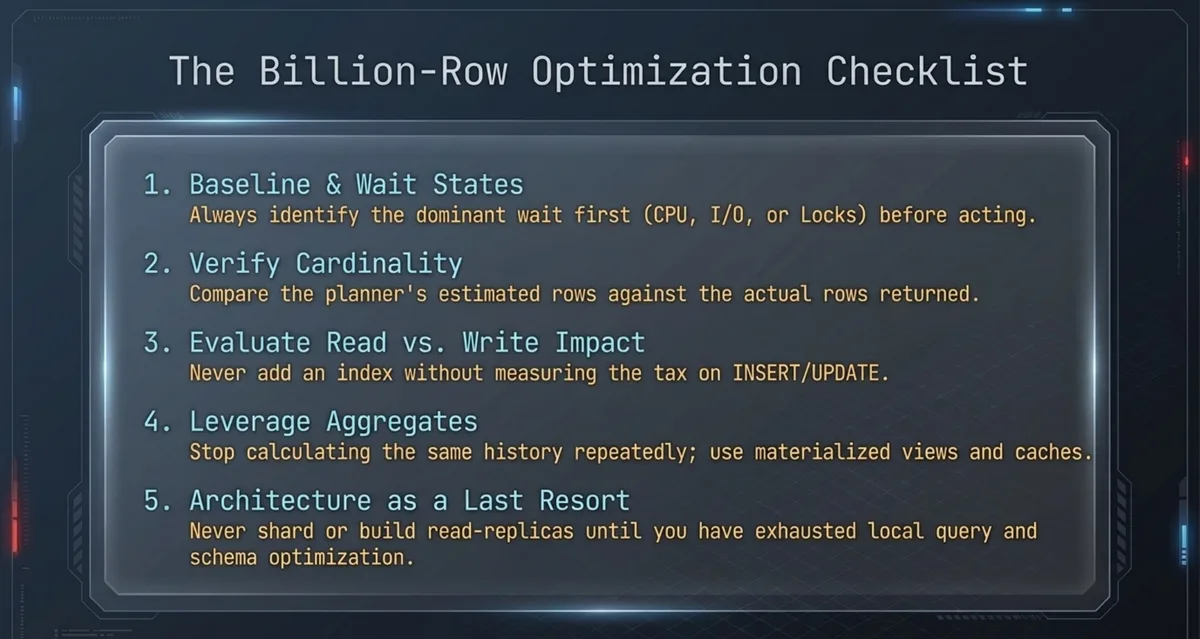
Frequent misses: indexes without a plan; the belief that partitions speed up any SELECT; memory "with headroom" and no wait profile; rewriting SQL without a reproducible test; dropping "rare" indexes that carry a monthly closing report; one transaction over millions of rows; shards before cleaning up local chaos; benchmarks at toy volume; ignoring write cost.
A one-pass checklist:
- Record baseline metrics and the problem queries.
- Name the main wait: CPU, I/O, locks, memory.
- Capture plans and compare cardinality estimates.
- Check statistics, indexes, selectivity.
- Assess the impact on reads and writes.
- Check behavior under concurrency.
- Consider partitions and an archive.
- Consider caching and aggregates.
- Only then, architectural offloading and shards.
- Repeat the test and write down the result.
Method applicability matrix
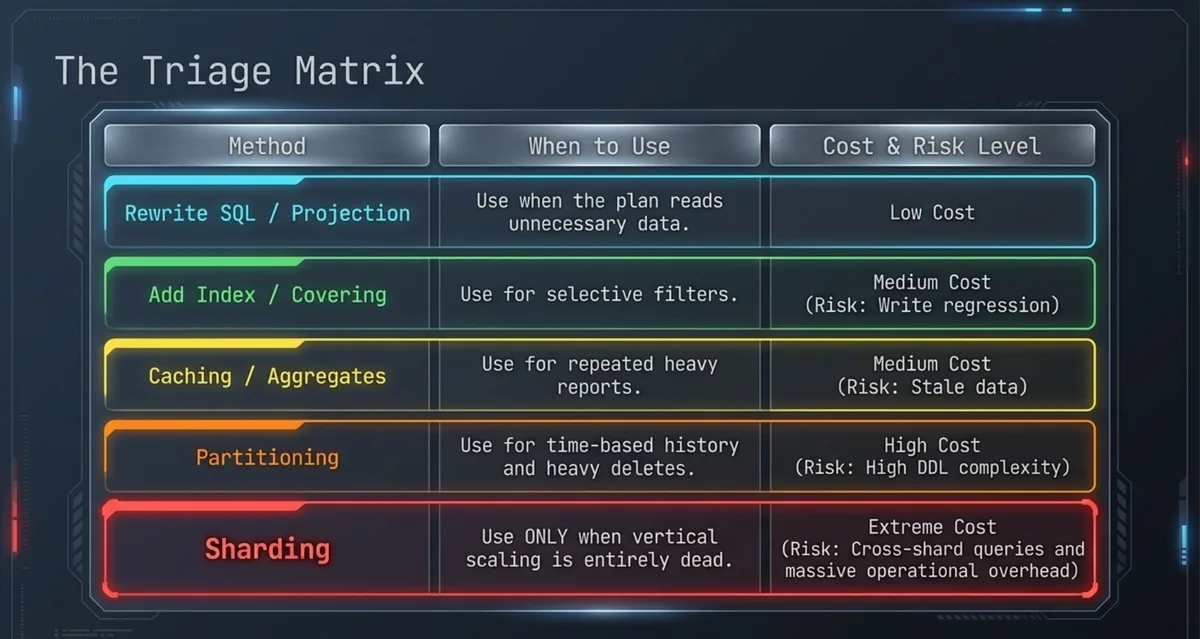
| Method | When it helps | Limitations | Implementation cost | Production risk |
|---|---|---|---|---|
| Rewrite SQL / projection | The plan reads extra data, there is a clear antipattern | Doesn't cure the EAV model or the archive | Low | Low when tested on a copy |
| Index / covering | Selective filter, repeatable path | Write tax, duplicates | Low–medium | Medium (write regression) |
| Statistics / sniffing | Row estimate is off, unstable plan | Not a replacement for schema | Low | Low |
| Partitions + retention | Time-based history, heavy DELETE | Needs pruning, DDL complexity | High | High without phasing |
| Cache / aggregates | Repeated reports and cards | Invalidation, freshness | Medium | Medium (stale data) |
| Replica / CQRS / warehouse | Reports choke OLTP | Lag, two systems | High | Medium–high |
| Shard | Vertical scaling exhausted, an access key exists | Cross-shard, operations | Very high | High |
Read the matrix from top to bottom: while the row above is not exhausted by measurements, it is too early to jump down. The exception is when it is already proven that reports systematically hit writes. Then moving reads out can be planned in parallel with local tuning, not instead of it.
FAQ
At what table size do you need "serious" optimization?
Short answer: from the moment p95 or maintenance stops fitting the budget, not from a round number of rows.
Ten million rows with a bad plan hurt more than a tidy billion. Look at the working set, selectivity, and concurrency.
The index isn't used. Should I add another one?
Short answer: no, ask the plan and the predicate first.
Type conversions, column order, low selectivity, or stale statistics often get in the way. A second index with no reason doubles the write tax.
Will partitioning speed up all queries?
Short answer: no.
The ones that prune partitions speed up, and so do maintenance operations. A query with no predicate on the partition key can get slower.
When should reports be moved off OLTP?
Short answer: when heavy history scans regularly compete with writes and can't be cured by aggregates in place.
A replica or a warehouse with CDC gives you headroom if report data lag is acceptable.
Can EAV stay if it is "well indexed"?
Short answer: for the accounting core, usually no.
Indexes remove some of the point reads but don't cancel the joins, typing, and reporting. Peripheral rare attributes are a different conversation.
Should I copy shared_buffers / max server memory settings from another project?
Short answer: no.
The data profile, the write share, and the other services on the machine are different. Copying numbers without the working set is a frequent source of regressions.
Further reading
Related materials on the site:
Conclusion
A large database has no single "make it fast" button. There is a cycle: measure, find the class of wait, change the query, the index, the schema, or the data layout, check reads and writes under load, and lock it in with monitoring. Sometimes an index and honest statistics are enough. Sometimes you need an archive and partitions. Sometimes you need to move reporting out and stop building the core on EAV. Choose by measurements, not by technology fashion. This week, one step is enough: take the slowest query from the top list, capture the plan with buffers or the actual plan, and write down what it is really waiting on.
Comments